Templater Rig prepares an Adobe After Effects project to build video compositions from structured data. Mark text, footage, or solid layers as dynamic, map data fields to them, and preview how each record changes the composition. It suits projects that need variations of a designed video, such as localized graphics, campaign ads, product videos, slideshows, or digital signage.
Connect data to After Effects layers
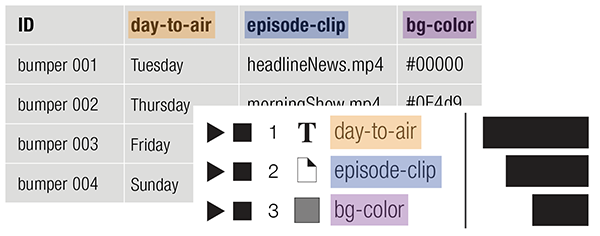
Templater can read a QUE campaign, a Google Sheets document (with Templater 3.5 or later), a tab-separated values (TSV) file, a text file containing JSON data, or remote JSON data from a URL feed. In the After Effects project, apply Templater’s custom effect to the layers that should change, then map each layer to a field in the data. Templater processes each spreadsheet row or JSON object and updates the mapped layers.
This setup is useful when a composition has a stable design but its copy, footage, or other layer content changes between versions. A team can prepare its project around the fields it expects, then use the data records to preview different combinations without manually replacing every mapped layer.
Check how each record fits the composition
Templater’s layout engine adjusts dynamic layers in relation to their composition and sibling layers. That helps preserve the layout as text or footage changes. You can preview compositions with data before moving into batch production, which gives you a chance to inspect records that may produce longer text, different footage, or other unexpected combinations.
Text values are read as they appear in the source, including punctuation and line breaks. Templater supports characters from different languages and right-to-left scripts. TSV and JSON text files must use UTF-8 encoding for international characters. The After Effects installation still needs fonts with the glyphs used by the text.
Where Rig fits among the editions
Rig prepares an After Effects project for dynamic content and previews data-driven changes. With Templater 3.7 or later, a licensed Rig installation connected to a QUE Meter account can also render, replicate, and run spot checks when it has an internet connection and credits. Each output consumes one credit; without credits, Rig’s Render and Replicate buttons are disabled. The Templater Pro edition adds desktop automation for batch rendering and replicating compositions. Templater Bot adds server automation and command-line controls, including workflows that process data and render in the background. Choose Rig for project setup and preview, Pro for desktop batch rendering and replication, Bot for server or command-line automation, or Rig with QUE Meter credits for pay-per-output rendering, replication, and spot checks.
Rig fits artists preparing a project for use with Pro or Bot and creators distributing Templater-compatible After Effects templates.