FX MagiCoin is an After Effects toolset for creating spinning coin graphics from native Shape Layers. It can create multiple coin layers in one composition, and it does not require additional plugins.
Create and customize coin layers
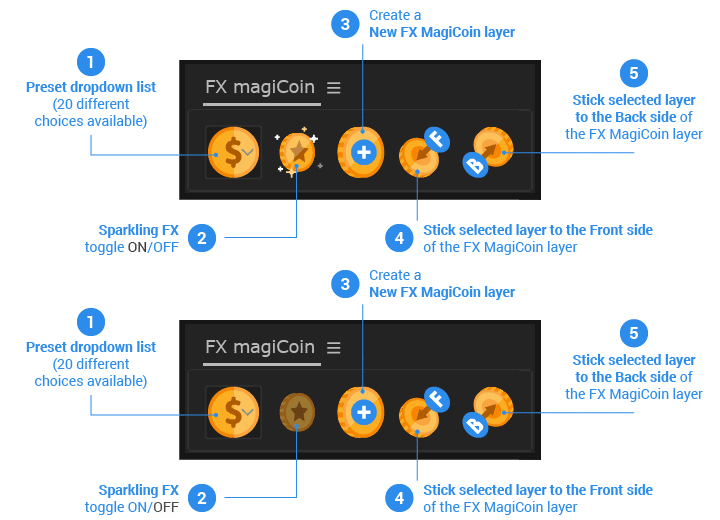
Choose one of 20 presets, then click the plus button to create a coin layer with its currency symbol and gold, silver, or copper material. The preset menu can also update the design of a selected FX MagiCoin layer after creation. For custom designs, controls cover the coin radius, symbols on each face, cloned ring elements, extrusion and core materials, stripe count, reflectivity, and material colors.
Animate coins and add artwork
Use Spinning Angle to control the spin and Spinning Orientation to choose horizontal or vertical rotation. To add sparkles, turn on the Sparkling FX option before creating the coin. FX MagiCoin creates a separate shape layer parented to the coin, animated by its Spinning Angle; the layer's effect controls its star shape, spread, scale, and animation speed.
You can attach a separate design layer, such as text, a shape layer, or a masked solid, to either face of a coin. This is useful when a needed currency symbol or other face artwork is not included in the presets.
Compatibility and setup
The compatibility list spans After Effects 2026 through CS6, and the toolset is listed for PC and Mac. For installation, use the aescripts and aeplugins Manager App or copy both FX_magiCoin.jsxbin and the FX_magiCoin_assets folder into After Effects' Scripts/ScriptsUI Panels folder.
CS6 users see preset names as text instead of round icons. In CS6, the effect appears as missing, but the error is cosmetic and the features still work.
Price and license terms
The listing shows a $19 suggested price. Individual users can pay any amount, while businesses and teams must pay the suggested price for a valid license. The EULA permits one installed copy at a time; multiple users or computers require appropriate licenses.