Vector Paint Studio is an After Effects tool for grouping paint strokes and working with them as a set. You can edit and simplify stroke paths, style and transform groups, animate strokes in sequence, and apply tracking data through its ReTrack engine.
This workflow suits shots where hand-drawn marks need to be revised or follow movement in a scene. The product listing names Marco Sanasi as the product's author.
Group strokes and refine their paths
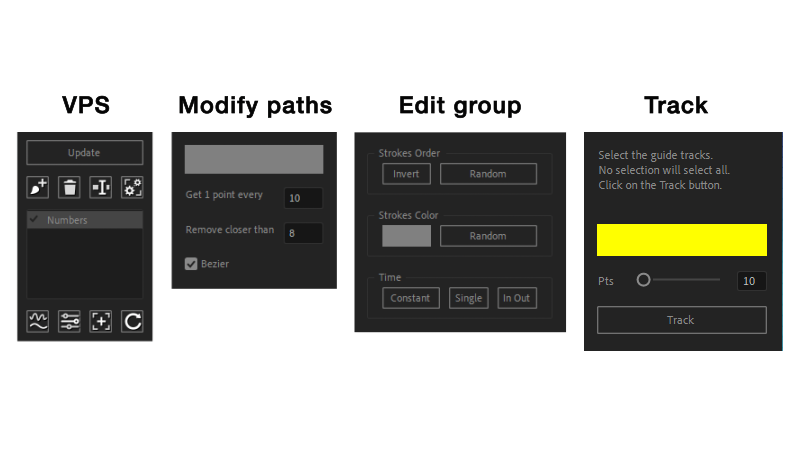
Draw strokes in After Effects, select the ones you want to manage together, then click Add and name the group. Once the strokes are grouped, use Modify Paths to reduce path points or edit the paths. This lets you adjust the drawing after the initial paint pass.
Choose Edit Group to work with the group's paint null options. The listing describes controls for styling, transforming, and animating the strokes. Sequential stroke animation is included, so strokes can animate one after another.
Apply tracking data to a group
Vector Paint Studio can apply tracking data to grouped strokes. Select a group and the tracked elements you want to use, then click Track. The product instructions list face tracking effects, track points, masks, a 3D camera, and 3D tracked solids as supported tracked elements.
After clicking Track, select the generated tracking points and run the tracking operation to apply that data to the group's strokes. If no generated points are selected, the tool uses all of them. This gives you a way to connect painted marks to tracked motion, such as a puppet face, light streaks, or a 3D-tracked scene.
Check the workflow and compatibility
The product listing includes a free trial and walkthroughs covering stroke grouping, path changes, group editing, hand-drawing, tracking examples, plus videos on activating a disabled paint panel, a tablet issue, and adding strokes to an existing group. Its compatibility list names After Effects versions from CC 2014 through 2026. Check the listing for the version you use before installing.