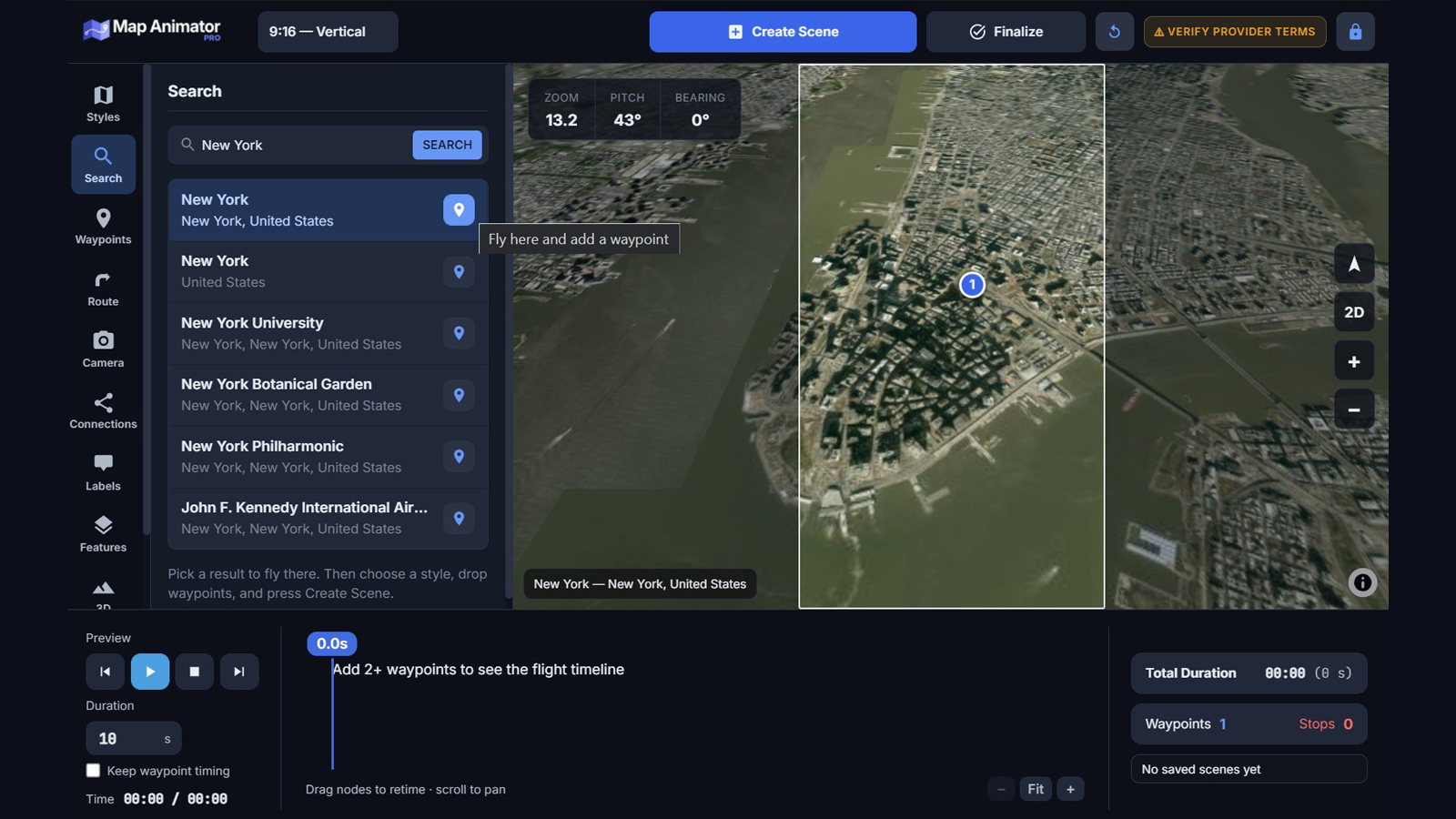
Map Animator Pro creates animated map scenes inside After Effects. Search for a place or add waypoints, then the plugin builds a composition with map footage, a 3D camera and keyframes, pins, attribution and an editable route layer. You can continue shaping the camera move with After Effects tools instead of accepting a fixed rendered video.
Plan and edit the camera flight
Search by place name, address or coordinates, or drop waypoints directly on the map. The panel preview matches the selected composition’s aspect ratio, including vertical and square formats, so you can frame the area that will be imported. Each waypoint can retain its own zoom, tilt and rotation. Turn a waypoint into a timed stop, reorder the flight, and adjust the duration of individual legs on the timeline.
Choose between Use Waypoints, Eagle Eye and Top View camera modes. Set the flight arc and field of view, then refine the resulting camera keyframes in After Effects. Labels are editable text layers attached to map coordinates; they can stay horizontal on screen as the camera turns. Stick to Map places an existing 2D layer onto the map plane at its current position, while Keep Size on Zoom holds pins or labels at a steady screen size during a zoom.
Create routes and map overlays
For road or walking routes, place points and let the route follow the road network. Turn snapping off to draw straight great-circle legs for a flight path. You can also import a GPX or KML track, edit the resulting route shape layer, and export a hand-drawn route as GPX. Multiple routes can share a scene, each with its own appearance and draw-on timing.
Connection lines join locations with editable arcs. Their endpoints can snap to waypoints, and a travelling null can follow an arc for a layer such as a plane. For geographic detail, choose OpenStreetMap data for surveyed features or Natural Earth for generalized shapes at world and continental scales. Coastlines, borders, rivers and lakes become editable After Effects shape layers.
Add terrain and buildings
The terrain tool uses open elevation data to create a textured mesh in After Effects’ Advanced 3D renderer. It can drape the selected map style over the relief, adjust vertical exaggeration and add a solid base. The route has a practical limitation in this mode: it is painted into the terrain texture, so it follows the ridges but cannot animate its draw-on. If Trapcode Mir is installed, Map Animator Pro can build the terrain on a Mir surface instead, keeping the route as a live shape layer that can draw on over the relief. The plugin can also export a 16-bit height map PNG.
Buildings use OpenStreetMap footprints and height data. They are grouped into five height bands, each of which can be colored and recolored. Each height band is delivered as a GPU-drawn 3D model instead of thousands of separate shape layers.
Refine, finalize and reopen a scene
Create Scene builds a preview-resolution composition for editing the move. After you adjust it in After Effects, Finalize renders the map detail seen by the camera at the composition’s resolution. It can update changed areas while reusing unchanged map data. Scene settings, waypoints, routes and connection lines are stored in the composition, so you can reopen the project and continue editing. Imported assets are placed in a Map Animator Pro Assets folder beside the saved project.
Compatibility, map sources and limits
Map Animator Pro is listed as compatible with After Effects 2024, 2025, 2026 and 2027. An internet connection is required for map tiles, elevation data and scene building. Downloaded tiles are cached and reused. OpenFreeMap, VersaTiles, CARTO and Esri satellite styles are listed as available without an account. Styles from MapTiler, Mapbox, Thunderforest, Jawg, Geoapify and Stadia require your own API key; keys are stored locally. You can also add Mapbox or MapLibre style.json files by URL. The panel shows a license badge for each style and adds its required attribution to the composition. Check the selected provider’s terms for your intended use.
Commercial work requires a full license. Its demo watermarks imported map images and excludes HD Finalize, vector map features and the 3D tools for terrain, buildings and height map export.
Map Animator Pro is suited to After Effects work that needs an editable geographic camera move, route animation or map-based scene. Its native layers and keyframes support continued editing in After Effects; its network requirement and the source-specific map terms should factor into project planning.