Layer Thief is an After Effects tool for copying properties from one layer to selected targets, including named layers in multiple compositions. It transfers items such as transforms, expressions, keyframes, effects, masks, layer styles, and text settings. A separate Relative Mode adjusts existing values across targets instead of copying values from a source layer.
Transfer layer properties and animation
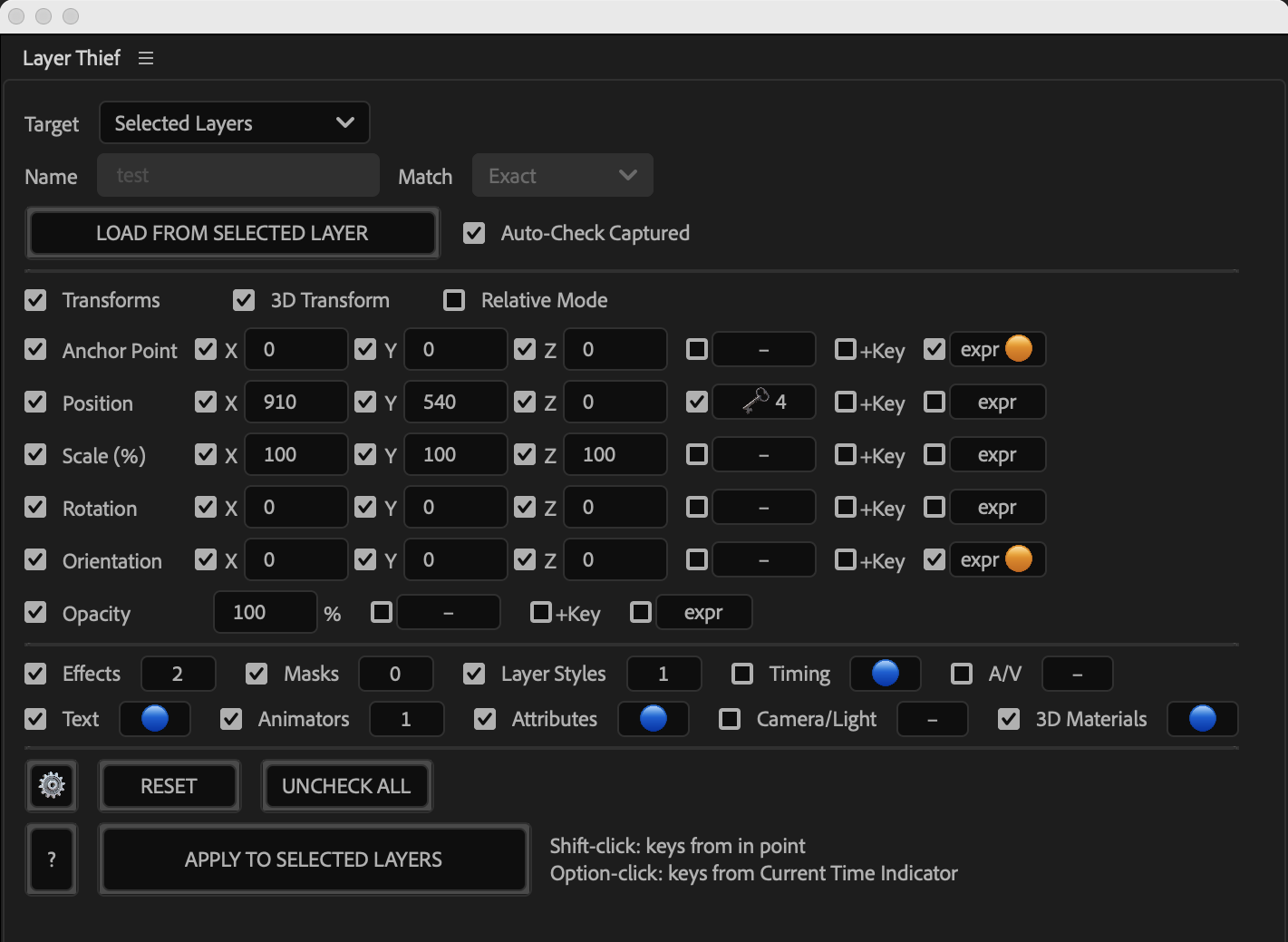
Choose which properties to apply, or use individual controls for finer selection. Transform controls include anchor point, position, scale, rotation, orientation, and opacity, with separate X, Y, and Z toggles so unchecked coordinates stay unchanged. Layer Thief detects when a target uses Separate Dimensions and bridges the coordinates during transfer. The interface also reports captured keyframes, effects, masks, layer styles, and animators, and indicates when a layer contains expressions, 3D materials, or text data.
When cloning keyframes, it preserves speed, influence, temporal easing, spatial Bezier handles, and roving-keyframe behavior. Shift-click aligns pasted keyframes to a target layer's In-point; Alt/Option-click aligns the first keyframe with the current timeline playhead. The tool also transfers Time Remapping with its keyframe timing and animation behavior.
Reuse text, effects, and masks
For text layers, you can transfer Character, Paragraph, and Layout styling while keeping each target's wording. You can also copy the source text, including animated Source Text and per-character attributes, or batch-change fonts across targeted text layers in selected compositions. Variable fonts are supported. Text animator groups can be copied with their selectors, though some animator types may need manual adjustment.
Copy all effects or choose individual effects, with options to include their keyframes and expressions. You can update same-named effects while leaving other target effects in place, replace the target's effect stack, or append the copied effects. Mask controls offer similar choices: update masks with matching names or replace the target's mask collection. Layer Styles can include their expressions and keyframes when enabled.
Make relative adjustments across layers
Relative Mode adds or subtracts a numeric offset from properties across target layers and masks. When properties already have keyframes, it shifts their values while preserving the animation curves, easing, and spatial motion paths. Enable +Key to add a keyframe at the current playhead: static properties are keyed there, while animated properties receive an offset keyframe without changing the remaining animation.
Work with precomps and 3D layers
Layer Thief can target layers inside precompositions through the Project panel, so you can adjust their properties without opening each composition window. It also transfers layer attributes such as parenting, label colors, blending modes, track mattes, and 3D switches. Locked layers can be accessed for changes and are automatically re-locked afterward.
For cameras and lights, it transfers settings, expressions, keyframes, and Point of Interest where applicable. It can also copy material settings, compositing options, and material assignments between compatible 3D layers and meshes, including animated material properties. Substance Materials are not supported.
Compatibility and licensing
The product page lists compatibility with After Effects 2020 through 2027. The EULA shown on the listing permits one copy for use on one computer at a time. Additional copies or users require an appropriate license for each.