Automated Video Editing for Premiere Pro assembles a music-led edit from your footage. Choose cuts based on the music, a constant interval, or your own markers. The generated sequence can then be adjusted in Premiere Pro.
Choose how cuts are placed
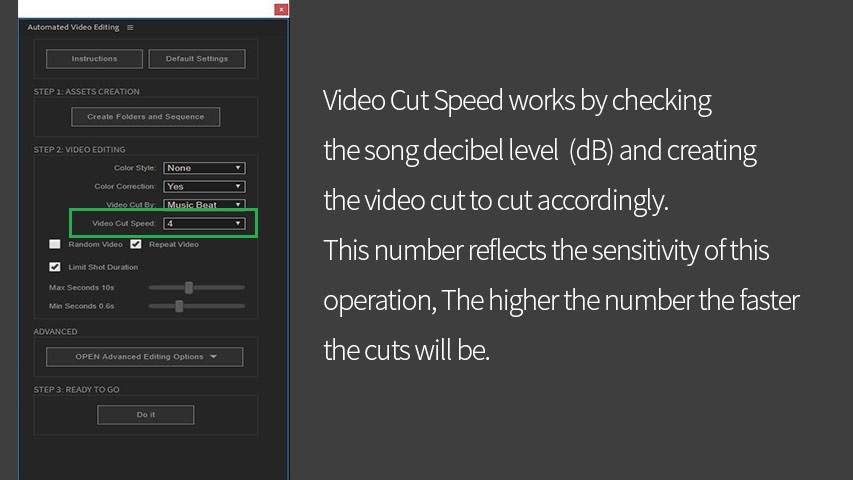
In Music Beat mode, cuts follow a music-volume threshold that you can adjust with a sensitivity control. Constant Time uses a set duration between cuts, while User Markers lets your own markers guide the edit.
You can set minimum and maximum shot durations, randomize footage selection, repeat footage, and choose whether clips start at a random point or at the beginning. Other controls include sequence size and frame rate, opacity dissolves and their duration, scaling across layers with reframe and scale animation, and color correction. The tool supports both long footage, such as GoPro clips, and shorter video files.
Set up an edit
- Select “Create Folders and Sequence” to create a sequence and separate folders for video and music.
- Import your video clips into the video folder and one music file into the music folder.
- Adjust the editing settings and select “Do It” to build the sequence.
Processing time depends on the edit length, computer speed, and selected settings. This workflow suits music-led promo, party, VJ, or wedding edits where you want an assembled cut to refine afterward.
Compatibility and licensing
The product listing names compatibility with Premiere Pro 2020, 2021, 2022, 2023, 2024, and 2025. Its displayed license agreement grants use of one copy on one computer at a time; additional copies or users require an appropriate license for each.