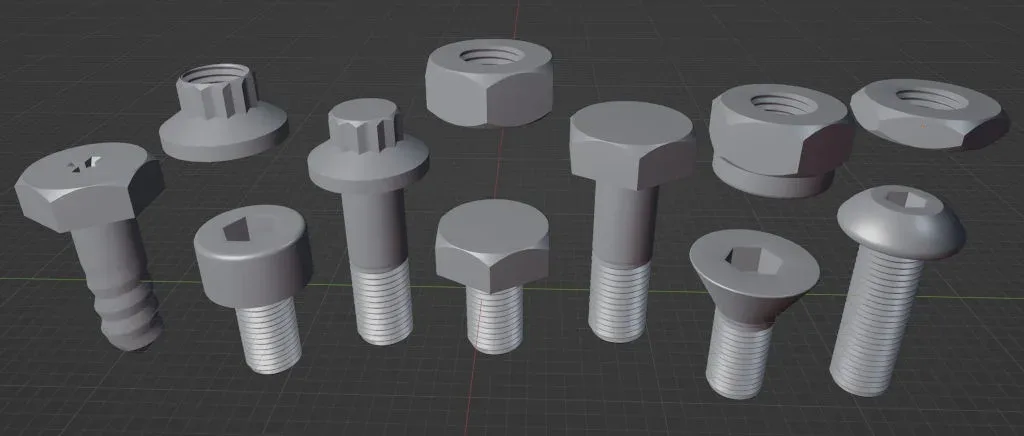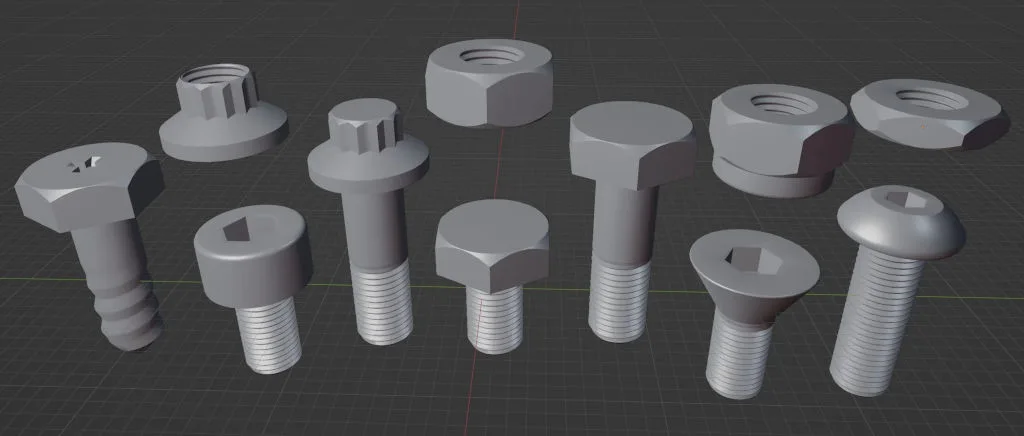
BoltFactory is a Blender add-on for creating bolt and nut meshes in a scene. It suits modelers who need adjustable fastener geometry for a design or assembly. The Blender Extensions API lists version 0.7.1 with Blender 4.2.0 as the minimum version.
Choose bolt or nut settings
You can choose bolt or nut, set dimensions, and select thread, bit type, or head design; a limited set of metric presets is included. These controls let you shape the generated mesh around a model instead of building each fastener from primitive geometry.
BoltFactory is useful when you need hardware detail in a Blender scene. For a visual model, adjust the dimensions and style to fit the surrounding geometry. For production use, verify the selected dimensions and thread details, including pitch.
Change a generated fastener
Add a new fastener from Add > Mesh > Bolt. After creating an object, you can use the context menu's Change Bolt option to reload its original settings and generate the mesh again. This is useful when you want to revise the dimensions without rebuilding the object from scratch.
Regeneration replaces the mesh, so manual edits to its geometry are removed. If you have adjusted vertices or faces by hand, keep a duplicate before changing the BoltFactory parameters. The product description notes that bolts in older files may have been built with a different add-on version.
Real-world dimensions and print checks
According to the product description, version 0.5.0 introduced real-world dimensions that do not change with the scene's Unit Scale setting. It gives a default M3 bolt height of 8 mm as an example.
BoltFactory creates the geometry; the available sources do not state that it guarantees a fit between printed parts. Before using a generated bolt and nut as functional hardware, verify their dimensions and thread settings, then test the fit of the parts you intend to use.
Blender version, license, and download
The Blender Extensions record names Bolt Factory as the maintainer and lists the GNU GPL version 3.0 or later license. Blender 4.1 included a bundled version of the add-on. Check the current extension listing for its version and Blender compatibility.
Visit the official BoltFactory extension listing for the available release. Blender's extension installation guide covers installation from disk. The BoltFactory source repository includes the project code and change log.