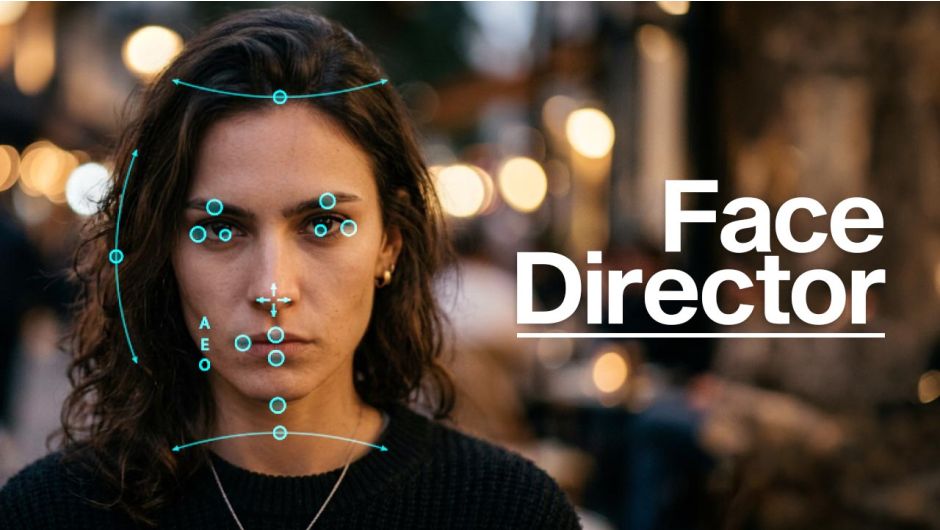
Face Director is a plugin for changing facial expression, eye direction, mouth shape and head pose in existing footage. It can help revise a performance or match a face across cuts without a reshoot. Face Director processes footage on your computer; it does not upload the footage.
Adjust a face in post
Controls cover smiles, the AAA, EEE and WOO mouth shapes, upper and lower lips, eyebrows, eye openness, pupils, neck length and head pitch, yaw and roll. These adjustments can reduce a smirk, match an open mouth to the next shot or change how a character appears to react. In After Effects, on-face handles let you drag a mouth corner, pupil or nose in the Composition panel; the corresponding control moves with the handle. The listing says the sliders support keyframes and expressions, including hold keyframes for abrupt changes.
Transfer motion from another face
Choose a layer with a face as the Driver Image to transfer its expressions, blinks, lip movement and head motion to the subject. Separate weights adjust how much of the driver comes through for the eyes, lips, pose and expression. Relative Motion keeps the subject's head pose while copying expression; turn it off to include the driver's head pose, controlled by Pose Weight. Exaggeration can increase or reduce the transferred motion. In DaVinci Resolve and Nuke, the driver connects to a second node input.
Face detection and framing
Face Director processes one face per layer: the largest face in each frame. For a shot with several people, apply it to an adjustment layer and mask the effect over the person to change. In After Effects, a mouth-only mask can use Input uncropped frame so the effect can still analyze the whole face. Crop Padding controls how much surrounding hair, neck and background are included. Upscale renders the edited face at twice the resolution, with a longer render time. In version 1.11.10, released November 12, 2026, frames without a detected face render unchanged.
Compatibility and requirements
The product listing gives compatibility ranges for After Effects 2022-2027, Premiere Pro 2022-2027, DaVinci Resolve 16-21, Nuke and NukeX 12-17, and Photoshop 2024-2027. The documentation also describes installing and activating Face Director in Final Cut Pro on Mac, but gives no Final Cut Pro version range. Photoshop provides expression and rotation controls. Face Director requires an Apple Silicon Mac, where it uses Metal, or a 64-bit Windows computer with an NVIDIA GPU and CUDA; Windows has no CPU fallback. The first installation also installs AI Machine, and Windows installation requires administrator rights.
The trial includes all features, but renders have a watermark until a license is registered. Activation requires an internet connection, and each license key is limited to the number of computers shown in the account. The full plugin license is for one user; floating and render-only license types are also listed.