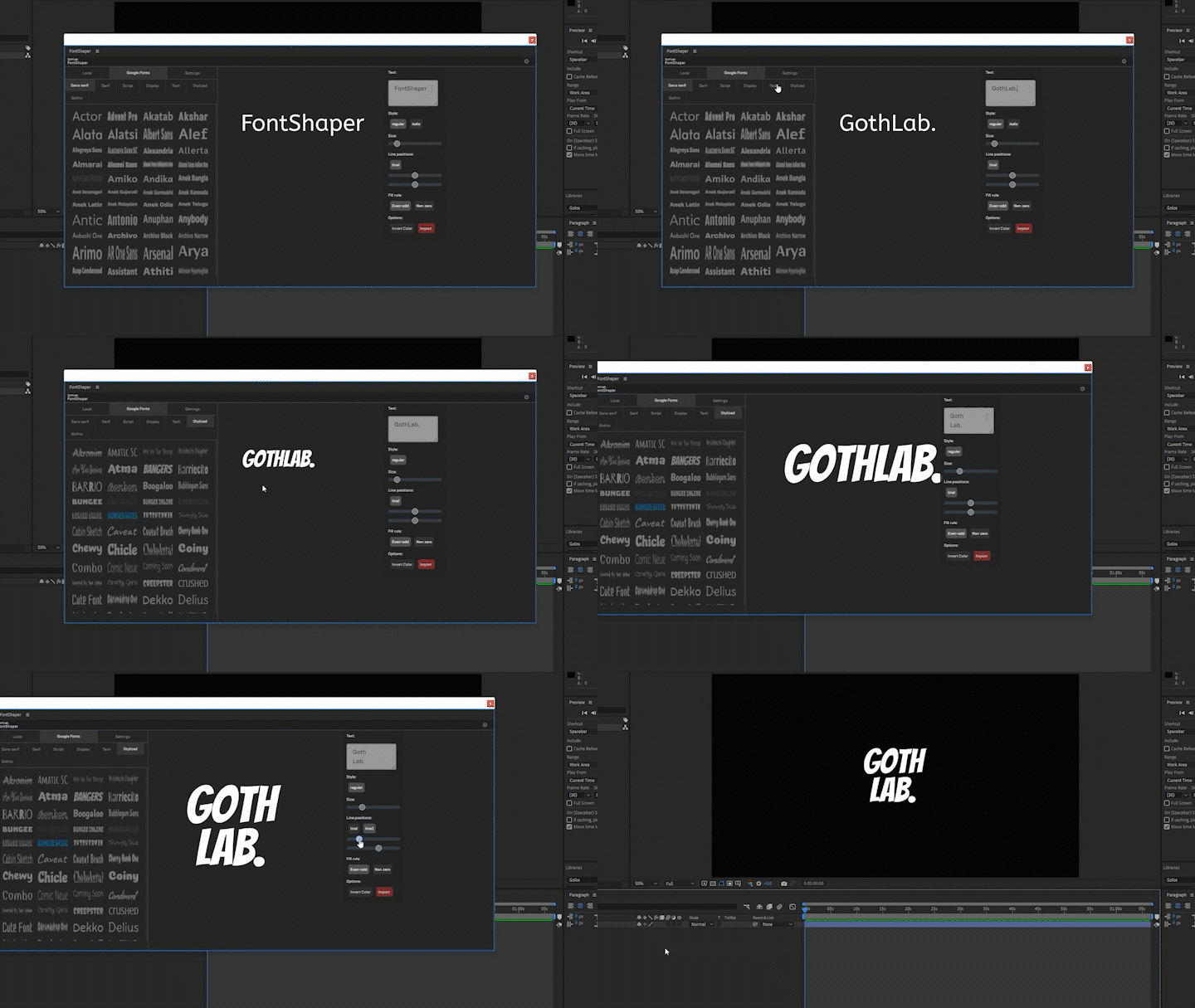
FontShaper turns text made with Google or local fonts into vector artwork for Adobe apps, without installing the fonts. After Effects receives shape layers; Photoshop and Illustrator receive SVG.
Set font options and choose where to save output
Choose a font and style, set its size, then adjust the fill rule and line position. Select where to save the output: the desktop, Documents, the project file location, or a custom path. Google Fonts require an API key; the product's setup notes refer to a Read Me file and tutorial for adding it.
Formats and compatibility
FontShaper supports TTF, OTF, and WOFF font files. It does not support WOFF2, EOT, or SVG as font inputs. The product page lists After Effects and Illustrator from 2024 back through CC 2018, and Photoshop from 2023 back through CC 2018. It says the CEP9 extension requires CC 2018 or newer.
On Apple Silicon, Photoshop must run under Rosetta. After Effects also needs “Allow Scripts to Write Files and Access Network” enabled under Edit > Preferences > Scripting and Expressions. Install with the aescripts + aeplugins Manager or a ZXP installer.
License scope
The EULA allows one copy to be installed and used on one computer at a time. Multi-user or shared configurations require an appropriate license for each user and copy. Transferring license rights requires the author's written consent.