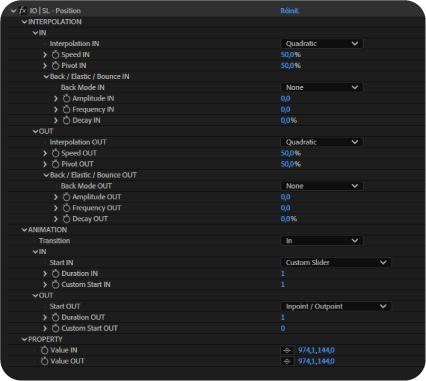
Inout is an After Effects effect for animating selected layer properties as they enter and leave the timeline. Its transitions follow the layer's inPoint and outPoint, so moving or trimming a layer changes the transition timing without adding keyframes. Supported examples include position, scale, rotation, and opacity.
Choose how to control timing
- Slider mode: Set transition duration and offset with sliders in the effect. The Custom Slider option provides dedicated sliders in the Animation section for shifting the animation.
- Marker mode: Control duration and offset with markers on the layer. Inout can create separate In and Out markers for each selected property, or one global In and Out marker for the layer when you hold Shift. With Custom Marker enabled, extend the markers manually.
Choose where effects live and how they are edited
Apply effects to the active layer that contains the selected properties, or create a dedicated controller layer to hold them. With a controller layer, keep the IO | prefix on effect names: Inout uses it to identify effects in its value and interpolation panels and for reset and delete controls.
Per-Property Effect gives each property its own settings. Master Effect centralizes animation and interpolation controls while retaining individual controllers for each property's value. This lets you choose between separate timing and easing for each property or shared animation controls across several properties.
Set up and refine transitions
For keyframe-assisted setup, select two keyframes for an In or Out transition, or four to set up both. Inout detects their values, durations, and timing and applies them to the effect for further adjustment. Its Interpolation panel includes Ease, Back, Elastic, and Bounce presets for In and Out transitions, with controls for fine-tuning. The Values panel has presets for position, scale, rotation, and numeric changes; adjust increments in Settings.
Compatibility, trial, and license
The product listing names After Effects 2022, 2023, 2024, and 2025 as compatible. The 10-day trial limits selection to two properties at once and processing to one layer at a time. The listing's EULA grants use of one copy on one computer; additional copies or users require an appropriate license for each.