Layer Name Tag is an After Effects script that arranges pre-comp layers in a grid and adds labels above them. The labels make similar-looking pre-comps easier to identify in the composition view.
Grid layout and live labels
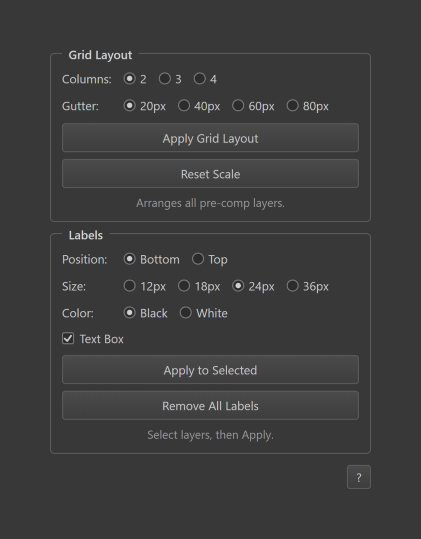
Choose 2, 3, or 4 columns and a gutter of 20, 40, 60, or 80 px. The script creates each label from its layer name, and you can adjust the label's position, size, and color. Rename a layer in the timeline or project panel and its label updates to match. Motion designers can use the grid to distinguish pre-comp layers in modular toolkits, render setups, or animation systems.
Compatibility and trial
Layer Name Tag supports After Effects 2022 or later (CC 22.0+). Its compatibility list covers AE 2022 through 2026, and the developer says it tested the script in AE 2024, 2025, and 2026. The 10-day trial limits each operation to 3 pre-comp layers. A license unlocks full functionality.
License type
The aescripts purchase flow displays a Floating License Server requirement. Its license guide says the server is needed for Floating licenses, while Single User licenses do not require it. Check the selected license type and the product terms before purchase.