MDrummer is MeldaProduction’s virtual drummer and drum instrument for creating kits and arranging drum parts in a DAW. Its rhythm system can generate intros, grooves, fills and outros from a starter beat and its library. You can control the performance with MIDI commands or the built-in Song tab. The range of editing options suits producers who want to shape both the drum sounds and the arrangement; the manual notes that MDrummer takes more learning than a simple virtual instrument.
Create and arrange rhythms
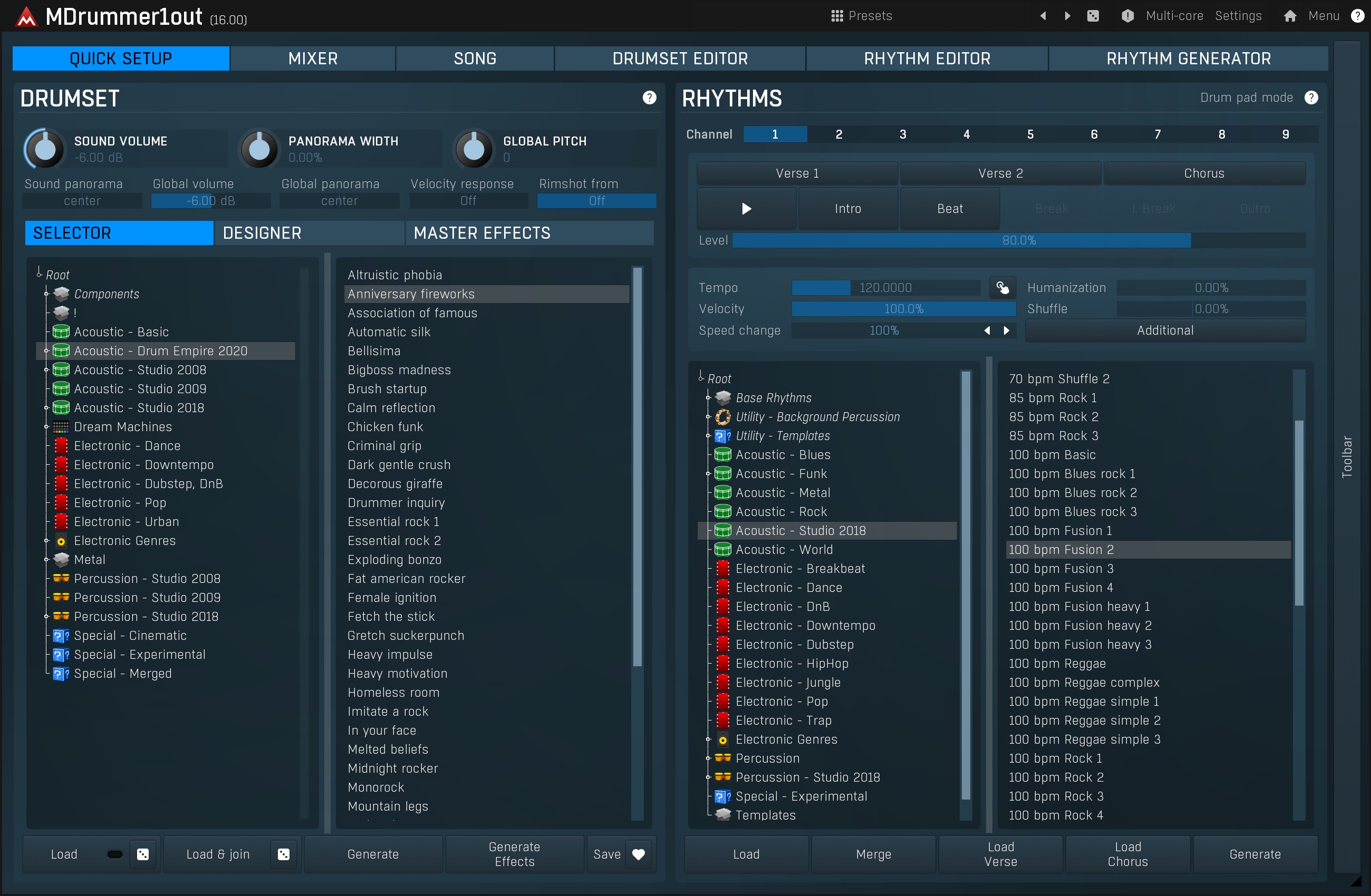
MDrummer keeps the drum sound and the rhythm separate. A drumset supplies the sounds; a rhythm contains loops for an intro, repeating beat, short or long break, and outro. You can load or merge existing material, then use the rhythm generator to build a full rhythm from an essential beat, a base rhythm and selected library loops. The generated result can be reviewed and edited. Humanization, shuffle and half- or double-time feel settings offer further ways to change a groove.
The manual describes up to nine rhythm channels, which can play together or handle different sections independently. For example, you can keep the main drum groove on one channel and add shakers on another, or switch to a different rhythm for a song section.
Control the performance
The MIDI command method lets a DAW arrangement trigger actions such as starting a beat, adding a break or ending with an outro. MDrummer reads these commands on MIDI channels 1 through 9; channel 10 is used for ordinary drum notes. Drum-pad mode disables the command method and lets all MIDI channels carry notes. An input MIDI filter can calibrate electronic drum pads. MIDI output filters can send MDrummer’s rhythm data to another drum instrument.
The Song tab provides an alternative for playback and jamming. It syncs with the host, but you need to update its song structure when you change the arrangement in your DAW. The MIDI command method keeps more of the arrangement in the host, though its commands depend on accurate MIDI timing. The MDrummer manual explains both workflows and their tradeoffs.
Shape kits and route audio
The sound engine combines samples, multisamples and synthesis. Each drum can have velocity layers and its own effects chain. You can merge or generate drumsets, edit individual sounds, and have MDrummer analyze your sample library to create drumsets and components from it. The mixer controls drum levels, panning, pitch, sends and effects.
Choose the plugin edition that matches your mixing setup. MDrummer1out sends a single mixed output to the host. MDrummer16out routes drums through multiple outputs for separate processing in the DAW. The manual says the unsuffixed MDrummer edition matches the 16-output version and remains for backward compatibility.
Compatibility, libraries and licensing
MeldaProduction lists Windows 10 and 11 in 64-bit hosts using VST, VST3 or AAX, with an Intel or AMD processor that supports SSE2. On macOS, it lists macOS 10.14 Mojave or newer, 64-bit VST, VST3, AU or AAX hosts, and Intel, AMD or Apple Silicon CPUs. See the vendor’s support information and system requirements before installing.
MDrummer’s sound resources are distributed as add-on packs. MeldaProduction says MDrummer Essentials is required for MDrummer to work; its drum libraries are free for MDrummer users. The manual says that, since version 12, you can download only the data you need, but all MDrummer data must remain in one directory.
MeldaProduction describes its commercial software as having a 15-day fully functional trial, after which it switches to demo mode with limitations. A license file activates the software; activation requires no internet connection or hardware dongle. The license is registered to one person and can be activated on any number of computers that person personally owns. The vendor says purchased software receives free-for-life updates, but may cancel that offer at any time. See its licensing terms for current details.