Parametric Primitives is a Blender add-on for creating adjustable mesh shapes. In version 1.0, the primitives appear under Shift+A > Mesh. Their settings are available in the N-panel's Parametric tab, which shows controls for the active object.
Create and adjust a primitive
- Press
Shift+A, openMesh, and choose a Parametric primitive. - Open the side panel with
Nand select theParametrictab. - Change the available settings for the active object. Supported fields accept metric and imperial values.
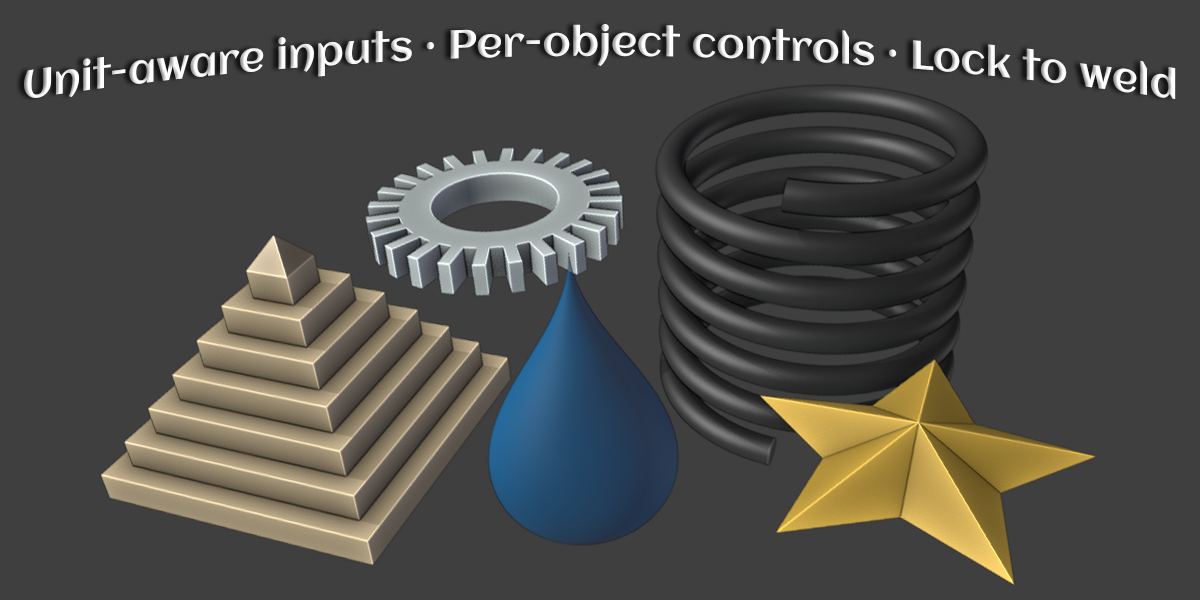
The initial release includes Box, Capsule, Cog, Cylinder, Drop, Pyramid, Sphere, Spring, Star and Tube. A Cylinder can act as a Cone, and a Pyramid can act as a Cake. The Star has collapsible sides.
Set pivots and lock the mesh
Each object has Top, Bottom and Center pivot settings, and can align to the 3D Cursor. The product listing notes that cursor alignment can help when aligning to face normals. For capped shapes, cap fill geometry can affect perceived height in some view modes.
Lock Parametric runs Merge by Distance with a default threshold of 0.001 to weld vertices. The listing recommends locking an object before changing its topology, which helps prevent an unintended mesh regeneration.
Install and check compatibility
Download the ZIP, then in Blender open Edit > Preferences > Add-ons > Install from Disk and select the file. The listing says the Parametric Primitives (All-in-One) add-on should then be enabled.
The marketplace lists Blender versions 4.0 to 4.4 and reports testing with Blender 4.0 (Portable) and 4.4.1. Its details identify the license as GPL. Check the Superhive product listing for current download and compatibility details.