RE:Vision Effects ReelSmart Motion Blur Regular is a post-production plug-in that analyzes movement between frames and adds motion blur. Editors and compositors can use it to add blur, adjust its amount, or remove existing blur in supported host applications.
How it handles motion
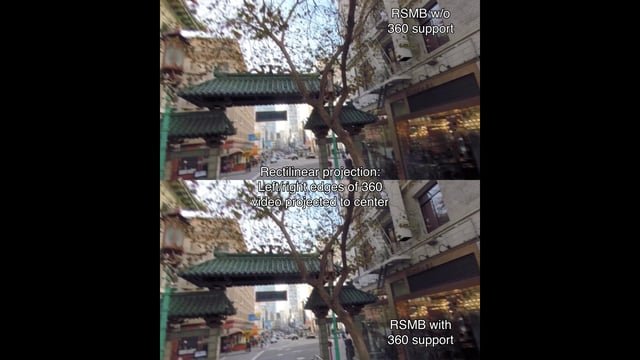
Automatic pixel tracking estimates movement from one frame to the next. The Fine Tune control adjusts the amount of blur, and the effect can also use motion vectors supplied by a 3D system. Its 360 Motion Blur mode accounts for the connected edges of panoramic footage, including the left and right sides and the top and bottom.
Supported hosts and license scope
RE:Vision Effects lists the Regular license for After Effects, Autograph, Catalyst Edit, Diamant and Dustbuster+, Final Cut Pro, HitFilm, Motion, Natron, Premiere Pro, Resolve, Toon Boom Harmony, and Vegas Pro. The Pro license covers additional hosts, including Baselight, Flame, Fusion Studio, Media Composer, Nuke, Scratch, and Silhouette. Check the developer's compatibility details for the version of your host application, and select its matching download.
Trial, version, and rendering
This catalog entry lists version 6.6.5. RE:Vision Effects organizes downloads by host and version, so check the relevant developer page before installing. The developer offers a free trial download; rendered images are watermarked until you purchase and register a license.
The plug-in supports GPU acceleration and can run in CPU-only mode when a GPU is incompatible. RE:Vision Effects officially supports GPUs with 1 GB of memory; GPUs with 500 MB may work but are not officially supported. The GPU driver must support OpenCL 1.1. GPU and CPU rendering can produce different results, so use one mode consistently within a sequence.
For current host compatibility and downloads, see RE:Vision Effects' After Effects and Premiere Pro page or Resolve page. The developer's GPU requirements page has more detail about rendering modes.