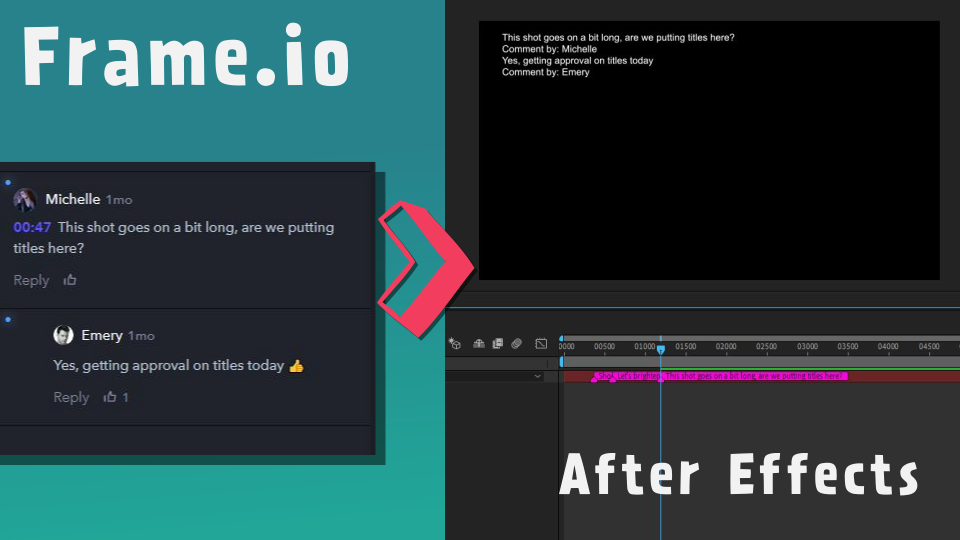
Review Importer is an After Effects script by Konstantin Reinhart that brings comments from video review services into a composition. Export the reviews, then import them as markers on a text layer. Choose a marker color and toggle the layer’s visibility to show or hide the review text overlay.
Supported review exports
Review Importer supports comments from Kollaborate.tv, Vimeo, Frame.io, and Screenlight.tv. Export steps vary by service:
- Kollaborate.tv: Open the video, choose Actions → Export → Comments, select CSV, and disable “Combine notes at the same timecode.” The script merges notes at the same timecode.
- Vimeo: Use the button in the video’s upper-right corner to download the CSV file.
- Frame.io: Use the download button above the comment list, choose “Download as file...,” then select CSV.
- Screenlight.tv: Export the reviews by selecting “Adobe Premiere Pro.”
Import comments into After Effects
- Open the composition where you want the review notes.
- Run Review Importer and select the exported file.
- Choose a marker color and click Import.
- Toggle the created text layer’s visibility to show or hide the review overlay.
Version and compatibility
The product listing identifies version 01.07, dated February 13, 2024. Its compatibility list covers After Effects 2024, 2023, 2022, 2021, 2020, CC 2019, and CC 2018. The 01.07 update notes a fix for a change in Frame.io’s CSV table.
Price and license
The listed suggested price is $9.99. Under the product’s Name Your Own Price terms, individual users may pay another amount; businesses and teams must pay the suggested price for a valid license. Check the product listing for current price and license details.