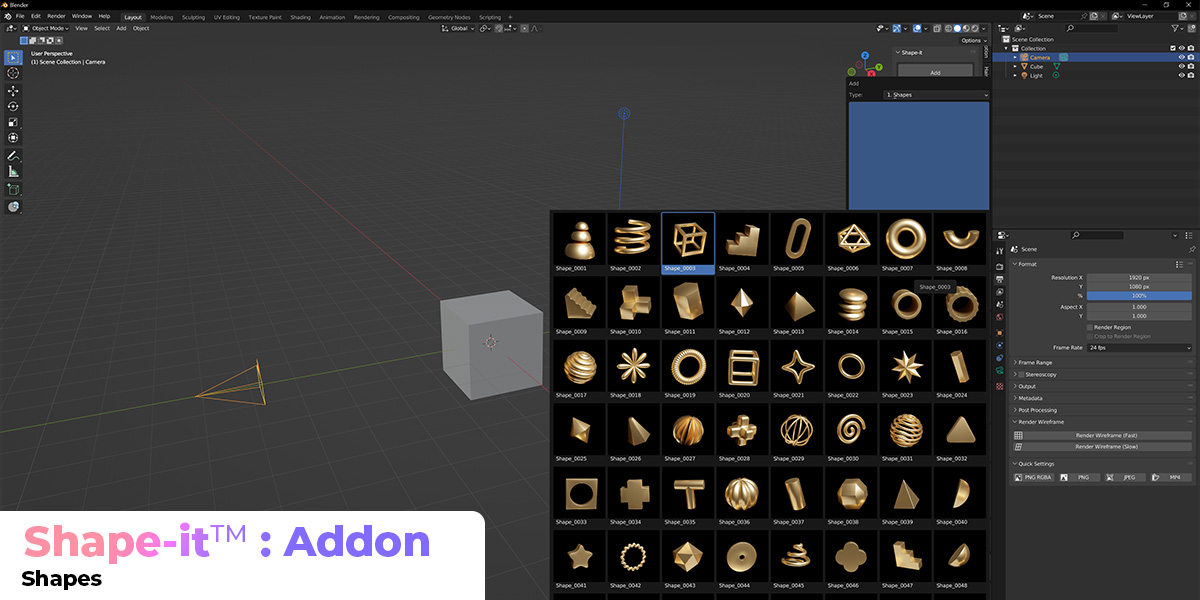
Shape It is a Blender package from Xane Studios for motion design and graphic work. It combines an add-on for working with scene assets and animation, more than 100 motion elements, over 35 animation presets, a six-material shader library, the DynaString simulation cable, and looping PNG sequences.
Blender tools and assets
The add-on imports motion elements, materials, and animation presets. Its Shape to Balloon tool turns a shape, a group of shapes, or text into a soft, simulation-ready balloon. Settings control the level of detail and helium, which the listing describes as gravity. Cloth Pinning uses pin objects to control cloth and balloons without entering Edit Mode.
To use an animation preset, select it and parent the object or objects to its key Empty. The included motion elements can be added to a scene for composition, physics exercises, or extra detail. DynaString is a simulation cable included for creating visuals.
The shader library contains six materials, including RedShift-style glass, gradients, speckled finishes, and thin or thick swirly materials. Importing the library adds the materials to the project; it does not apply one to the selected object automatically.
PNG sequences for video and graphics
Shape It also includes looping, high-resolution PNG sequences of animated shapes. The sequences come in glass and gold or metal materials, and their hue and effects can be adjusted. They let you add animated 3D elements to video without working directly in 3D software. The same sequences are also intended for web, UI, branding, and graphic design work.
Installation and compatibility
The Superhive listing identifies Blender versions 3.0 through 5.2 and a GPL license. Its documentation page gives brief installation steps: download Shape-it.zip, install the Python file, link the Shape-it folder in Preferences, then find the add-on in Blender's N-Panel. Check the listing for current product and license details.