Sitni Sati FumeFX is a gaseous fluid dynamics plugin for Maxon Cinema 4D. It uses voxel-based simulations for fire, smoke, explosions and similar effects. Its fire and smoke respond to forces such as temperature and gravity. The plugin is aimed at visual effects artists, game developers and visualization professionals who need to build these simulations in a Cinema 4D scene.
Simulation controls and viewport
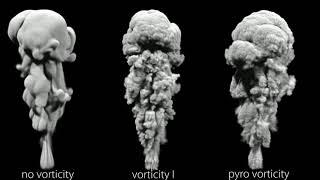
Version 6 adds Pyro Vorticity with Surface Breaker for detail inside a flow and along its boundaries, including pyroclastic-style results. Adaptive-grid attributes let artists control grid expansion from velocity and added pressure separately, or turn off adaptive-grid contraction. Simple and Geom Sources can add pressure to create low- or high-pressure areas.
For explosion shading, Explosion Preprocess options provide controls for cinematic results with Arnold and its nodes. The GPU-accelerated viewport produces render-comparable previews and can export PNG images during a simulation. FumeFX also brings simulation, rendering, presets and source parameters into one interface. While a simulation runs, users can change simulation, source and object parameters, but cannot render, change the simulation type or Extra Detail mode, or switch the input cache.
Renderer and cache workflows
The FumeFX for Cinema 4D product page identifies version 5.0 and lists native support for Cinema 4D's Standard and Physical renderers, Arnold, Redshift and Octane. The FumeFX 6 Cinema 4D manual documents an Arnold/Redshift volume shader that loads FumeFX caches. That version 5.0 page lists V-Ray and Corona for rendering caches through OpenVDB. This is a cache-based handoff, so check which settings and attributes carry through to the external renderer. FumeFX 6's release history lists Arnold 7.3.1.0; the version 5.0 page does not establish whether its V-Ray, Corona or Octane paths apply to FumeFX 6, or give a minimum Redshift version. Confirm exact combinations for your host and renderer before production.
Host and system compatibility
Sitni Sati's store lists FumeFX 6 for Maxon Cinema 4D R24 through 2024 on Windows 10 or later. The FumeFX 5 Cinema 4D installation guide reports Windows 8 64-bit and Windows 10 64-bit as tested, requires SSE 4.1, and recommends at least 8 GB of memory; those older hardware notes do not establish FumeFX 6's processor or memory requirements. The version 6 release history records support for Cinema 4D 2024. The store listing does not confirm later Cinema 4D releases.
Simulation across machines
FumeFX tasks can run on another computer through Deadline or remote desktop software. The remote machine needs a compatible FumeFX or FumeFX SL installation. This can suit a team that wants to offload simulation work, provided the remote setup matches its version and configuration.
Choosing a renderer workflow
FumeFX fits projects that need gaseous effects simulated within a Cinema 4D workflow. Check the host version and renderer path before choosing it: the FumeFX for Cinema 4D product page identifies version 5.0 and lists Standard, Physical, Arnold, Redshift and Octane as native renderers; it lists V-Ray and Corona for OpenVDB cache rendering. The FumeFX 6 Cinema 4D manual separately documents an Arnold/Redshift volume shader that loads FumeFX caches. The FumeFX 6 listing covers Cinema 4D R24 through 2024.