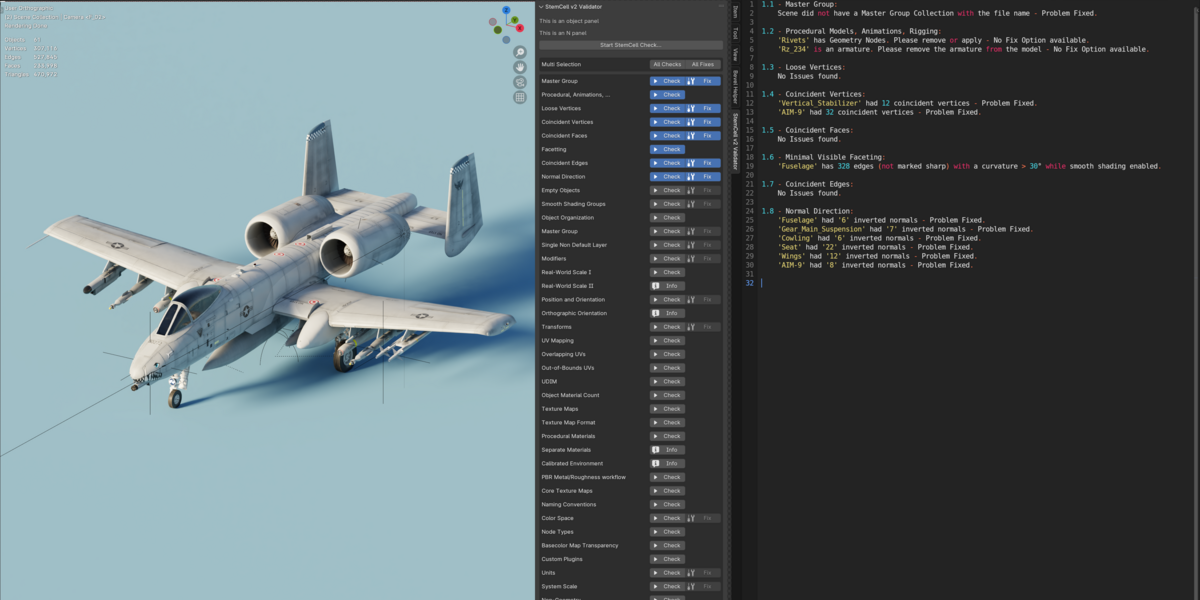
Stemcell V2 Validator is a Blender add-on by simulux for checking models and scenes against TurboSquid’s StemCell v2 Specification. It reports issues found during a check and can apply fixes for some requirements, giving artists a way to review compliance within Blender.
What the validator checks
The specification covers areas such as textures, materials, naming conventions, and scene setup. The product’s FAQ gives a texture file that does not follow naming conventions as an example of a reported issue. Artists can also use the add-on to check specific Blender organization or texture setup rules, including a PBR Metal/Roughness workflow, according to the product FAQ.
Run a StemCell check
- Install the add-on through Blender’s preferences.
- In the 3D Viewport’s N-Panel, choose which rules to check and which available fixes to enable. The panel includes All Checks and All Fixes options.
- Open a Text Editor beside the viewport and select Start StemCell Check.
- Read the report in the Text Editor. If a problem has no automatic fix, correct it manually.
Run the check again until no more issues arise, following the documented StemCell check instructions
Compatibility and license
Superhive lists the add-on as Blender Extension-compatible for Blender 4.0 through 4.5, under the GPL license. Its listing identifies v1.1.3 as the latest version, dated October 2025. Check the current product listing for updated version and compatibility details before installing.