TextDuratifier is an After Effects script by Artem Artemenko that sets text-layer duration from the text and a viewer reading-speed value. It is designed for text-based videos, including projects where you are working with text in an unfamiliar language and would rather calculate timing than repeatedly listen through the sequence.
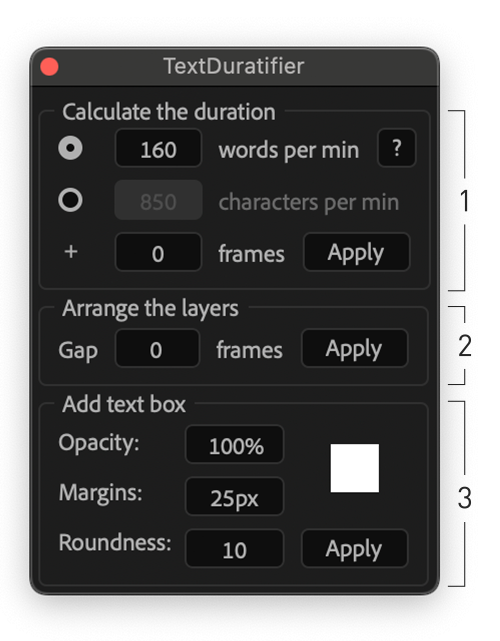
Calculate duration from words or characters
Choose words per minute or characters per minute as the timing mode. The script starts with a default reading speed, which you can adjust. You can also add frames to a layer's duration to leave room for an opening or closing animation, hold the text on screen longer, or keep a short, single-word layer from passing too quickly.
These controls give you a starting point for pacing text layers. Review the result in your composition and adjust the speed or added frames to suit the text and animation.
Arrange layers and add a text background
After calculating durations, TextDuratifier can arrange layers sequentially on the timeline. Set a gap in frames between layers when the sequence needs a pause. The script can also create an adaptive text box, with controls for its margin, corner radius, opacity, and color.
That makes the tool useful when a composition contains many text layers: timing, sequencing, and a background shape can be handled as parts of the same text workflow.
Fit for text-based video work
TextDuratifier is aimed at editors and motion designers who time subtitles or other on-screen text in After Effects. The developer lists compatibility from After Effects CS3 through 2025. Check the TextDuratifier product page for current version, trial, and compatibility details before using it in a project.