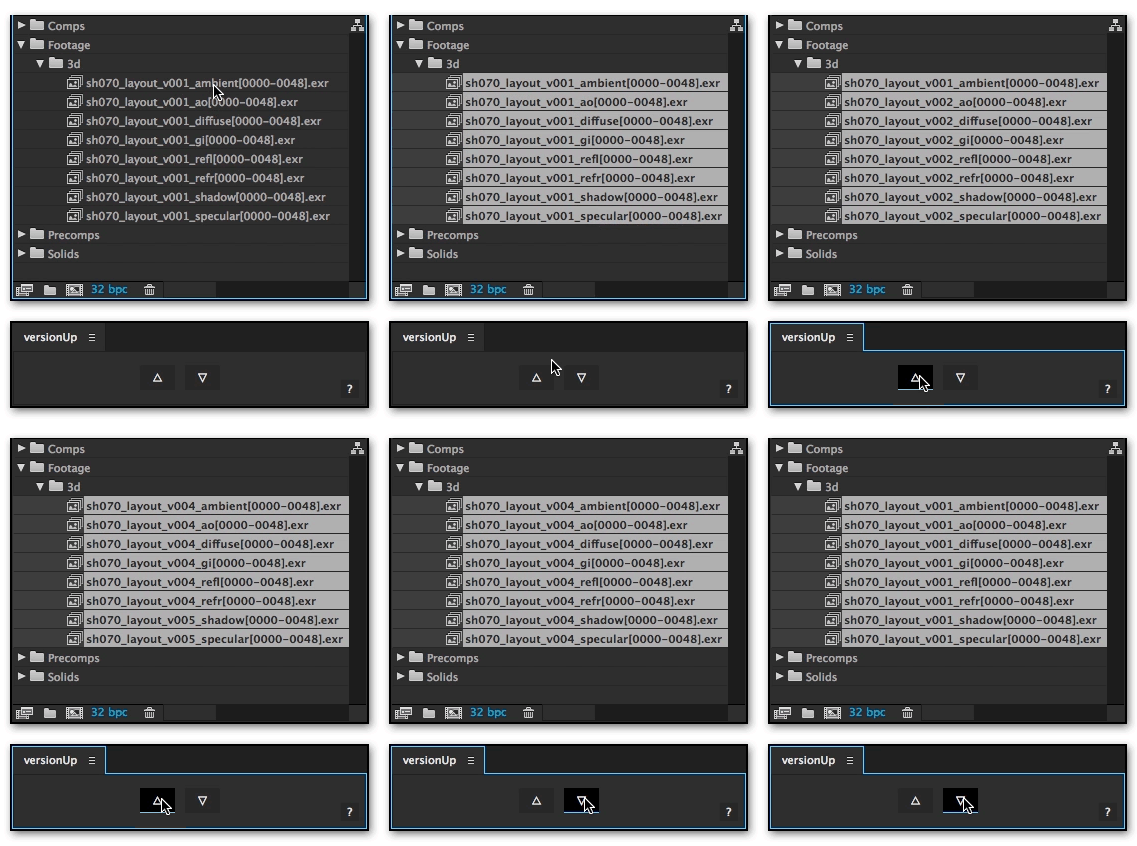
versionUp is an After Effects script for moving selected footage between numbered file versions. Select one or more items in the Project panel and use the up or down arrow to switch to the next available version. It skips versions that do not exist, so you can step through a sequence without replacing each item by hand.
Choose a version or variant
Shift-click the up arrow to jump to the newest available version, or Shift-click the down arrow to find the oldest. Option-click, or Alt-click on PC, increments a letter after the number, such as changing v001a to v001b. The script works with stills, movies, and image sequences. It can also version composition and folder names.
Use it with a versioned file pipeline
For versionUp to find matching files, the only difference between them should be the version number, in the filename or elsewhere in the path. The version prefix must stay consistent and can be any letter, often v, while the number can use any consistent padding length, such as v1, v01, or v001. versionUp updates version numbers throughout the path, not only in the filename. Multiple different version numbers in one filename or path can produce unexpected results.
The panel has adjustable settings and a dynamic interface that can fit different After Effects workspaces. Included non-UI scripts can be assigned to Kbar buttons, and custom keyboard shortcuts can be bound to versionUp actions. The aescripts product listing includes the README and a shortcut tutorial.
Compatibility, price, and limitations
The compatibility list on aescripts covers After Effects releases from CS5 through 2026. The listing shows a suggested price of $12.99 under its Name Your Own Price terms. Individual users may pay any amount; businesses and teams must pay the suggested price for a valid license. Check the developer's listing for current details.
Versioning an image sequence with a different start frame will likely fail.