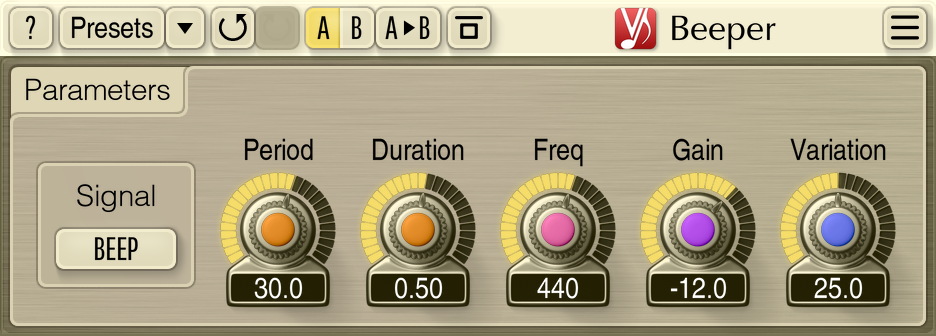
Voxengo Beeper is a free auxiliary audio plugin for adding short, timed beeps, filtered noise bursts, or volume reduction to audio. It is designed for producers sharing demos, previews, or stems who want to add a protective mark or interruption.
Choose a signal and set its timing
Select Beep, Noise, or Mute. Period sets the time between events, and Duration sets each event's length. Freq controls the beep pitch or, in Noise mode, the filter's corner frequency. Gain sets the beep or noise level, or the amount of volume reduction in Mute mode.
Variation randomizes the beep parameters, which makes automated removal harder. Voxengo's guide also says noise bursts are technically harder to remove without sonic artifacts.
Workflow and compatibility
Load Beeper in a compatible audio host and configure the signal, interval, duration, frequency, and gain for the preview or stem. It supports stereo and multichannel processing, all sample rates, and adds no processing between insertions. Voxengo lists zero processing latency.
The plugin works in hosts that support AAX, AudioUnit, VST, or VST3. Voxengo lists Ableton Live, Cubase, Logic Pro, REAPER, Pro Tools, FL Studio, Studio One, OBS, Bitwig Studio, and other hosts. It specifies 32- or 64-bit Windows, 64-bit macOS 10.12 or later, a 2.5 GHz dual-core processor or faster, and at least 4 GB of RAM. Voxengo also lists native Apple Silicon support and macOS Sonoma, Sequoia, and Tahoe. Its Mac download provides AU, AAX, and VST3 formats; the Windows download provides VST, VST3, and AAX.