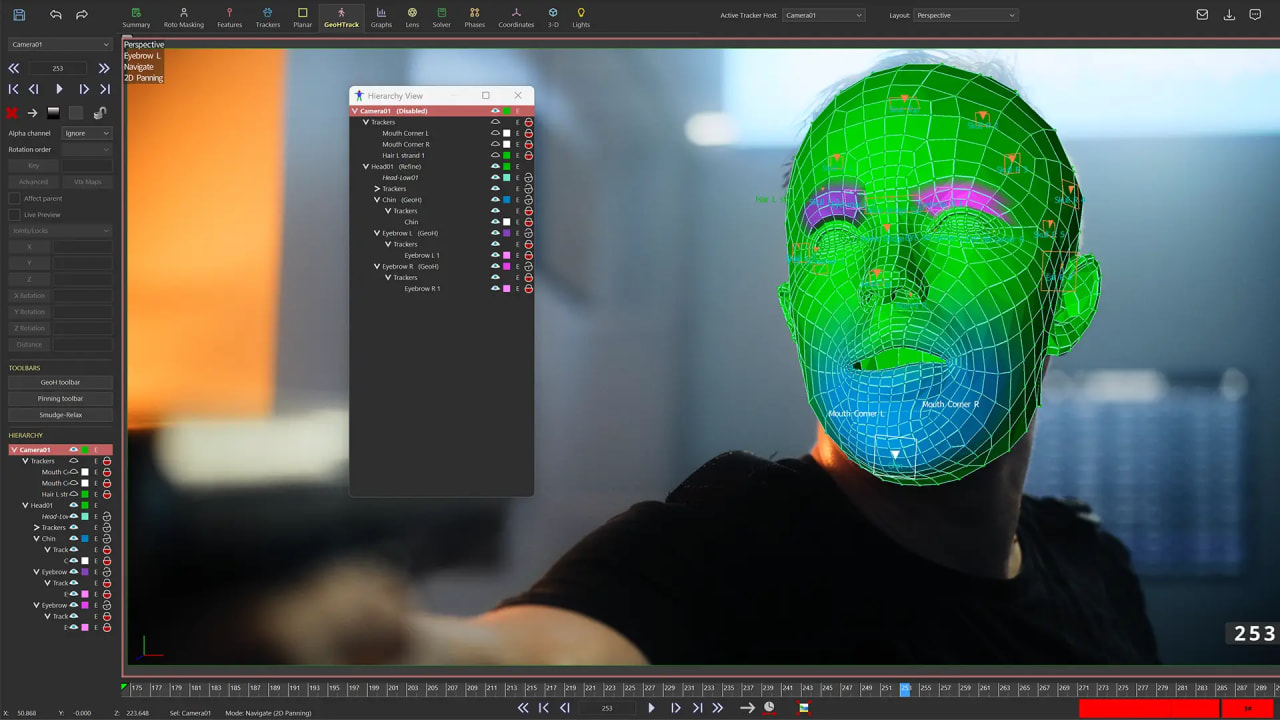
SynthEyes is Boris FX’s standalone software for 3D camera solving and object tracking. It turns footage into camera or object motion that can be refined in a scene and sent to 3D and compositing applications. The 2026 release adds an affine-aware Mocha point tracker, Live Preview for GeoH refinement, and expanded USD and USDZ scene imports.
Tracking and solving from footage
SynthEyes includes automatic and supervised tracking, 3D planar tracking, AprilTag tracking, and tools for refining camera and object paths after a solve. Geometric hierarchy tracking works with meshes or constrained motion hierarchies, such as linked parts that need to move together. Mask ML and traditional masking tools can isolate moving subjects or exclude areas from tracking.
The 2026 Mocha Point Tracker follows a small planar patch and returns a 2D point for the solve. It tracks rotation, scale, and skew as well as translation, which can help reduce drift on rotating, scaling, or partly blurred surfaces. Live Preview updates GeoH objects as trackers, pivots, or constraints change, so you can inspect the current frame while adjusting a hierarchy.
Lens calibration and scene setup
Lens tools cover distortion analysis and calibration for anamorphic, fisheye, and other lens types, including 360-degree footage. Calibration can use grids such as checkerboards or random-dot patterns. Before or after solving, scene tools help set scale, orientation, and coordinates, align a solve to a 3D set model, or use survey measurements to constrain the scene.
For a detailed description of tracking, calibration, and coordinate workflows, consult the SynthEyes manuals.
Exports and pipeline handoff
Multi-Export centralizes export setups, with presets that can be reused at user, scene, or facility level. SynthEyes exports scene data for applications including Maya, 3ds Max, Blender, Cinema 4D, Houdini, Nuke, After Effects, Fusion, and Flame. It also supports USD and USDZ workflows. The 2026 release expands USD imports to include USD, USDA, USDC, and USDZ scenes, retaining hierarchy, cameras, and lights; USDZ textures are imported with the asset.
These tools suit workflows that need to move a solved camera, tracked object, lens data, or scene geometry into another application for compositing or 3D work.
Operating systems and hardware
Boris FX lists SynthEyes for macOS Monterey 12.7.6 or later, Windows 10 or later, and RHEL 8 or a compatible Linux distribution such as Rocky or Alma Linux on x86_64. The listed minimum memory is 8 GB, with 16 GB recommended. Processor and graphics requirements vary by operating system and workload. Machine-learning features have additional GPU requirements, so check the current specifications for your system before installing.
Boris FX recommends opening the PDF manuals from SynthEyes’s Help menu; on macOS, avoid the Help menu’s search box because it searches macOS help rather than the application documentation. Its SynthEyes Essentials training also covers topics including tracking, lens distortion, coordinate systems, object tracking, and export.