Action Loader is a Blender add-on by frederico4d for listing and switching actions on a selected object, usually an armature. Blender stores animations for objects and armatures as actions. Action Loader helps manage several animations on one character, particularly for game animation. It works with actions already in a project and does not include animation clips. View Action Loader's listing for product details and Blender builds.
Switch actions and set the scene range
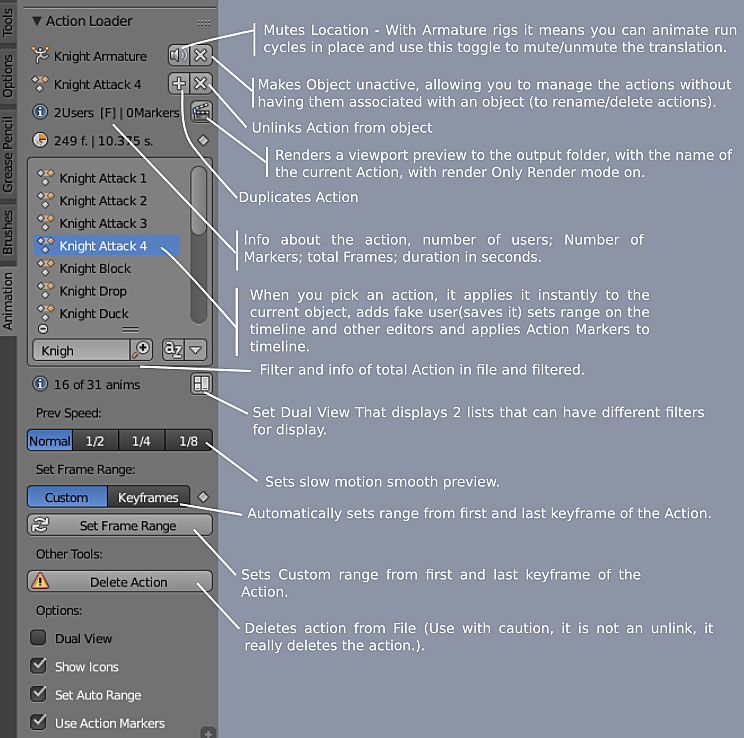
Select an object and choose an action from the list. When you switch, Action Loader saves the current action's frame range, applies the new action, and updates the scene range to match. You can optionally set that range from the action's first and last keyframes. The add-on also zooms the Timeline, Dope Sheet Editor, and Graph Editor to the action.
You can switch actions while animations play in a loop, which makes it easier to preview several clips in sequence.
Browse a large action library
A name-based filter narrows the list, so a consistent naming pattern can help when a file contains many animations. For example, names that include “fight” can make combat clips easier to find. Action Loader also assigns fake users to actions so they remain stored in the file.
For each action, the list shows its name, frame count, duration in seconds, user count, and fake-user status. It also reports the total number of actions and how many remain visible after filtering.
Reuse actions across characters
Actions can be shared across objects and rigs with different proportions when the corresponding bones use the same names. The developer's description also notes that character-specific bones can have their own animation data. This makes Action Loader useful for browsing a shared animation library across several characters.
Install and choose a Blender build
The installation guide describes installing the .py file as a normal Blender add-on. It notes that actions begin appearing in the list as you animate an object. The developer's listing currently separates downloads into builds labeled Blender 5+, Blender 2.8x to 4.5, and Blender 2.79 (legacy). Check the listing and choose the build that matches your Blender version. The product listing identifies the license as GPL.