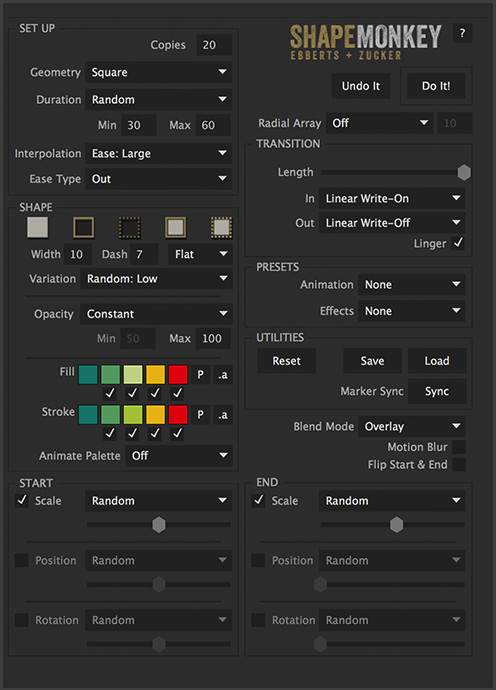
ShapeMonkey is an After Effects tool for creating procedural shape-layer animations. The ShapeMonkey feature list says it also works with text and vector artwork. It is designed to make experimentation and quick iterations easier when shape-layer controls are buried in subcategories.
Use shapes, text, or vectors
You can start with one of ShapeMonkey’s modular preset shapes or use your own shape layer. The listing also names text and vector artwork as supported inputs. That gives motion designers several ways to build a composition around the artwork they already have, while keeping shape animation at the center of the workflow.
Change movement, color, and layout
ShapeMonkey includes preset animations and effects, multiple transition types, and dozens of interpolation combinations. It also has preset palettes and automatic palette animation, and can import .ase files. An instant radial array provides another way to arrange shapes in a composition.
Adjust timing and movement
Marker sync can trigger animations to beats, and dynamically linked markers make timing adjustments easier. Turbulence and drift controls add options for organic movement, while pseudo-effect controls expose additional settings. You can save and load projects.
When ShapeMonkey may fit your work
ShapeMonkey may suit projects that need procedural shape animation, repeated variations, marker-based timing, or animation involving text and vectors.
Check compatibility and support
The product page lists After Effects 2026, 2025, 2024, 2023, 2022, 2021, 2020, CC 2019, CC 2018, CC 2017, CC 2015.3, CC 2015, and CC 2014. It also links to a separate CS6 notice; review those instructions if you use CS6. The listing includes a free-trial link. For product-specific help, it directs users to open a support ticket with the author.