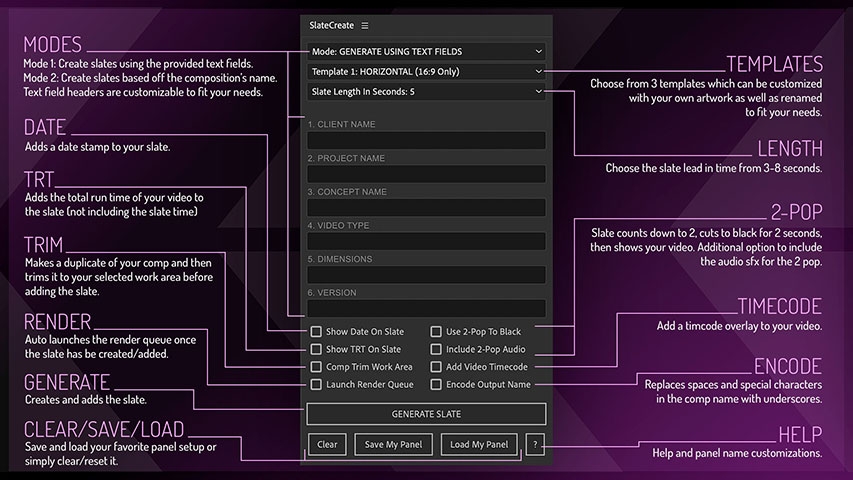
Slate Create is an After Effects tool for adding a slate to the front of a video. You can enter slate text in its panel or generate it from the selected composition’s name. The product listing describes a short workflow for creating and adjusting slates inside After Effects.
Generate a slate from a composition
- Select a composition.
- Fill in the panel’s text fields, or choose to generate the slate from the composition name.
- Choose the available options.
- Select Generate Slate.
When a composition name already contains the text you need, Slate Create can generate a slate from that name with one click. Panel customization also lets you adapt the fields to your naming workflow.
Fit the slate to the project
The product description says Slate Create accounts for the composition’s size, aspect ratio, frame rate and duration when generating a slate. It includes three templates that you can customize with your own artwork. These options let you choose a starting layout and adjust it for the project.
Reuse panel settings
You can save and load a favorite panel setup. When After Effects or Slate Create opens, the panel also repopulates with data from the last slate generated. Saved settings are useful when you return to a familiar slate format; the restored data keeps the previous slate details available in the panel.
Timing and date options
The product’s version history lists version 1.1.2 as adding single-frame slate lengths and fixing a date dropdown bug. Version 1.1 added date-format selection in the help and settings panel for the Add Date To Slate option. The selected date format is then used as the default.
Check After Effects compatibility
Slate Create is made for After Effects. Compare the compatibility versions in the product listing with your installed release before purchasing or setting up a project. The FAQ below lists the versions named there and clarifies the timing limit for the 2 pop option.