MoDeck.io connects After Effects templates to a browser editor and a local render machine. A template owner chooses which Essential Graphics controls editors can change. The desktop app assembles those edits and renders them through After Effects or Media Encoder on a connected computer. MoDeck suits teams that need recurring campaign, product, or language versions while keeping the animation design consistent.
Build a controlled editing workflow
Prepare one or more MOGRT files in After Effects and place them in a named folder inside the MoDeck Sync folder. That folder becomes an online template, and its subfolders appear in the browser editor. The owner needs the MoDeck desktop app and After Effects on a macOS or Windows computer. Editors can work in a browser without After Effects or access to the source project.
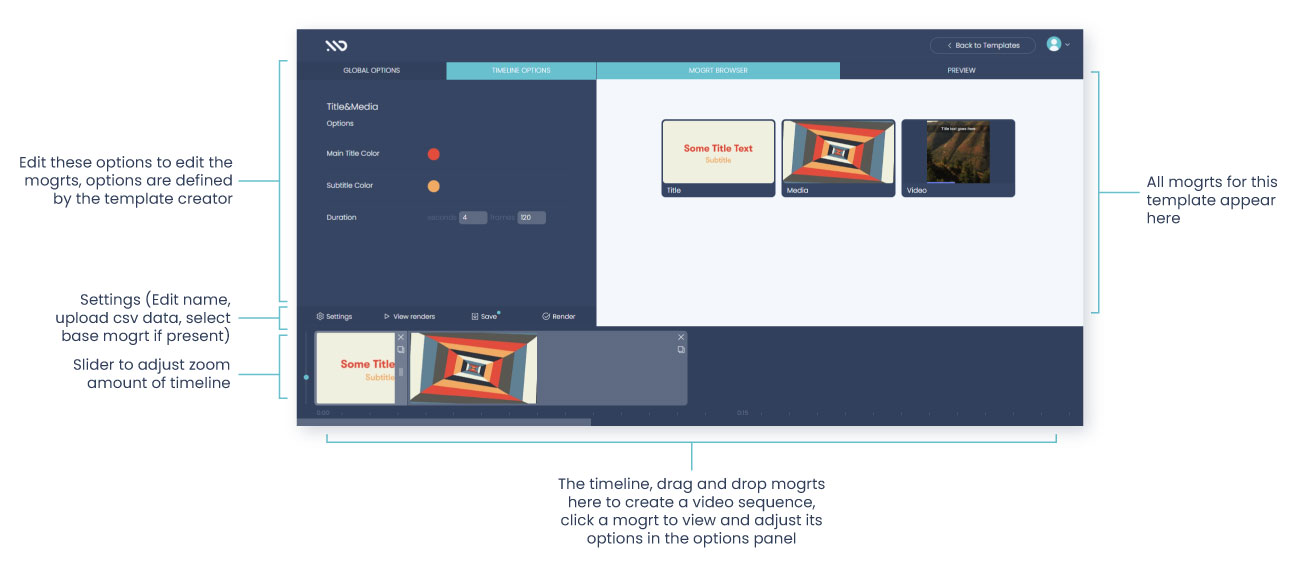
The template owner exposes and names the fields editors should use, such as text, media, colors, or choices. MoDeck can also connect template-wide options to controls in several scenes, set show or hide conditions, and define a fixed scene sequence. These settings let editors supply content while the owner controls which scenes and options are available.
Choose a guided or flexible editor
The Journey editor presents choices one at a time, which fits a single scene or a tightly controlled form. The Sequence editor gives editors a timeline where they can add, reorder, and reuse permitted MOGRT scenes, then preview the edit. The owner can use a predefined sequence when editors should provide values without changing the scene order.
Generate video versions from data
In the Sequence editor, link MOGRT or template-wide controls to CSV columns, a Google Sheet, or values from an HTTPS JSON response. Each included spreadsheet row or JSON array item can become a video version. A practical workflow is to map the data, preview a representative version, then request the batch. Owners can schedule data-driven renders or skip rows based on a column value. Scheduled jobs need a render machine online at the scheduled time.
The current plan table lists a 15-day trial with no payment card required. CSV and Google Sheets batch limits are 3 rows on the trial, 30 on Pro, and up to 100,000 on Enterprise. Multi-video batches from JSON arrays are an Enterprise feature.
Plan for local rendering
MoDeck coordinates render requests; it does not provide a cloud render farm. The desktop app must be signed in and connected to After Effects for fresh previews and final renders. Closing the app, signing out, putting the machine to sleep, or losing access to After Effects stops that machine from processing jobs. The local machine also needs the template assets, fonts, media, and any selected Media Encoder presets.
Source AEPs and locally referenced template assets stay on the render machine. Browser-uploaded media and completed renders use MoDeck file services when upload is enabled. Templates can define multiple output dimensions, but the artwork needs to be authored for each aspect ratio; changing the composition size does not automatically rearrange the design.