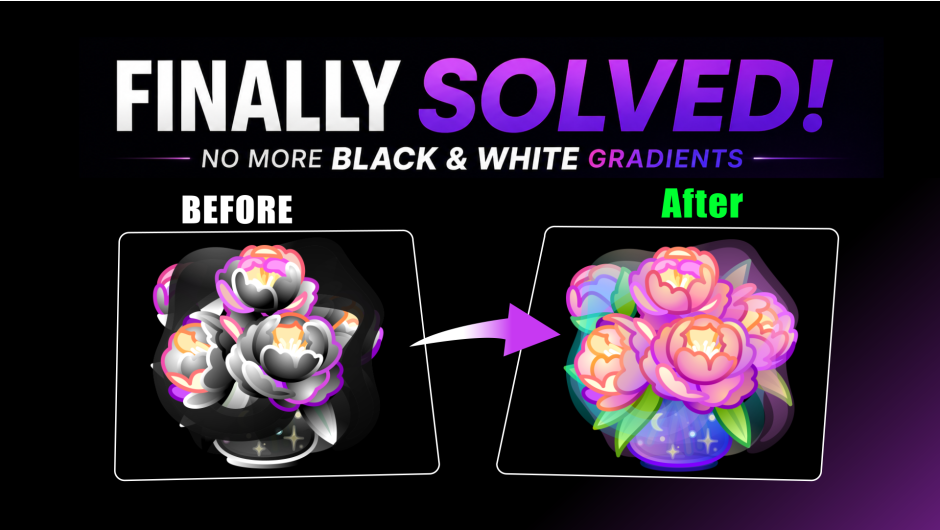
GradientFix Pro is an After Effects script for restoring gradients in imported Lottie animations. It addresses imports where gradients become black and white, lose their fills or strokes, or stop animating correctly. The script reads the original Lottie JSON and rebuilds native After Effects Gradient Fills and Gradient Strokes, including their colors, stops, timing, and animation keyframes.
Repair workflow
Import the Lottie JSON into After Effects with the LottieFiles or Bodymovin extension. Then:
- Open GradientFix Pro from the After Effects Scripts menu.
- Select the same original JSON file used for the import.
- Select the main composition containing the animation.
- Click Fix Gradient to rebuild the gradient data.
Who it fits
The workflow suits motion designers and Lottie animators who need to recover gradients in an imported animation without recreating them by hand. It can also fit UI and product designers preparing Lottie assets for presentations, marketing animations, or app interfaces. The repair requires both the imported composition and its original JSON file.
Compatibility and licensing
GradientFix Pro supports After Effects CC 2019 through 2026, and a free trial is available. The EULA, updated October 21, 2025, permits one copy on one computer at a time; multiple users or computers require an appropriate license for each user and copy.