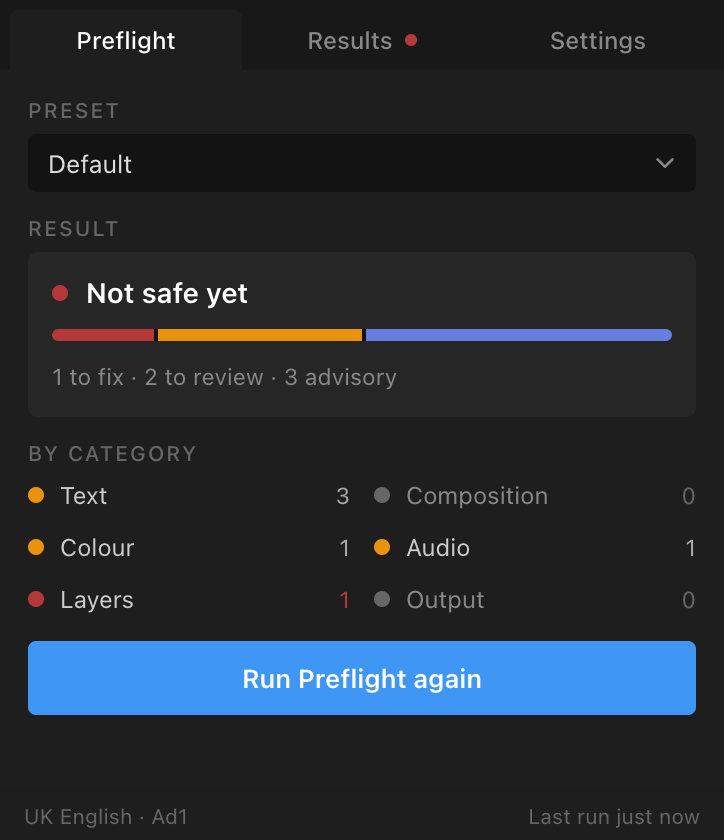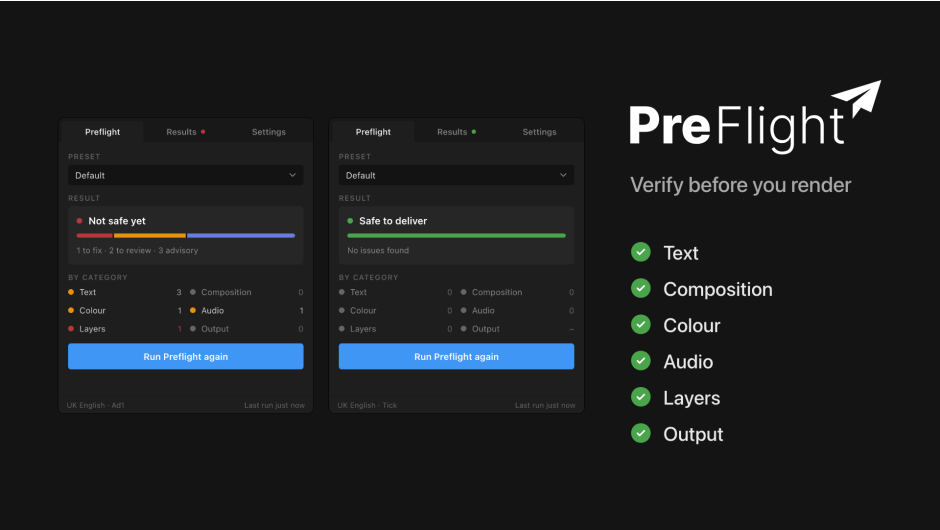
PreFlight is an After Effects panel that checks an active composition and its nested pre-comps before rendering. It runs 49 checks across text, composition, colour, audio, layers and output, then groups findings as Fix, Review or Advisory. Each finding links back to the layer and comp where you can inspect it.
What PreFlight checks
The checks cover issues that can be hard to spot in a timeline or preview, including:
- Text: spelling suggestions, doubled words, common errors such as a/an and stray spacing around punctuation, punctuation and style inconsistencies, and empty text layers.
- Composition: work areas that cut off content or extend into black frames, mismatched frame rates, text near frame edges, disabled cameras, and settings that differ from a declared delivery target.
- Colour: CMYK footage and high-bit-depth projects heading to an 8-bit codec.
- Audio: a comp with sound queued to render without audio, audio layers reduced to silence, and duplicate audio layers.
- Layers: solo switches, missing footage, visible placeholders, draft quality, proxies, guide layers, near-zero opacity and other states that can affect the render.
- Output: extra render queue items, render span, disabled effects, output resolution and quality, temporary or missing destinations, and low disk space.
Review findings in context
Fix findings identify problems the product classifies as blocking a confident delivery. Review findings point to likely problems worth checking, while Advisory findings may be intentional. Text findings are never graded Fix because a spell checker cannot know whether a name or term is misspelled.
Click a finding to open the relevant comp, select its layer and move the playhead to a frame where the issue is visible, including when the layer is inside a nested pre-comp. After you make a correction in After Effects and return to the panel, resolved findings cross themselves off. You can dismiss an intentional finding, and PreFlight remembers that choice for the project.
Spell checking for motion graphics
PreFlight checks text layers with motion graphics in mind. Its examples of text it leaves alone include 4K, 1080p, 60fps, hashtags, URLs, email addresses, SaaS and iPhone. It also compares text for inconsistent punctuation, capitalization, quote styles, date formats and font sizes. A spelling correction changes the layer in one undoable step, and custom client or brand words can be added to the dictionary.
The product lists 16 spelling dictionaries covering UK and US English, French, Spanish, Polish, Russian, Romanian, Greek, Turkish, Bulgarian, Slovak, Slovenian, Serbian in Cyrillic and Latin, Welsh and Georgian. Chinese, Japanese, Korean and Thai text is skipped with a note rather than flagged as misspelled.
Before the next render
PreFlight is intended for motion designers who want a repeatable check before delivering a project. After Effects can warn about missing fonts and footage when a project opens; PreFlight also checks render settings, layer switches, timing, text and queued output. It can flag missing footage that is still set to render after the opening warning has been dismissed.
Checks run when you press Run. The panel is dockable, and the product page lists macOS and Windows support, installation through the aescripts + aeplugins Manager, and a free trial. Check the PreFlight product page for current version and compatibility details.