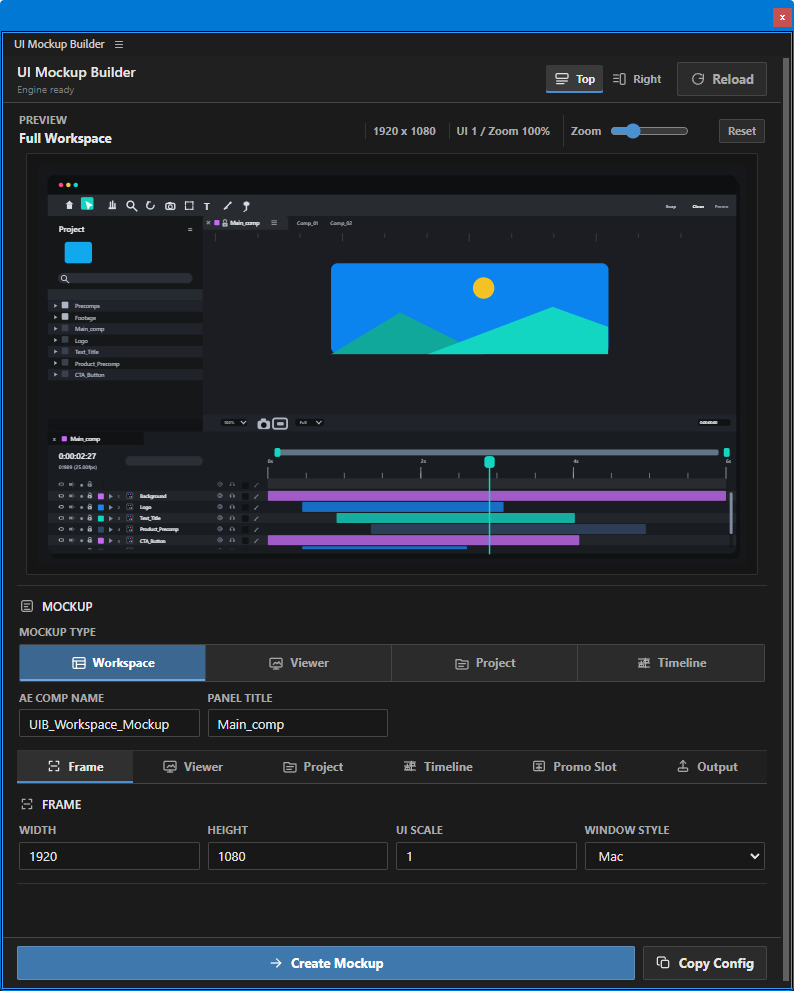
UI Mockup Builder creates editable, After Effects-inspired interface scenes for product promos, tutorials, and demos. Generate a full workspace or a standalone Composition Viewer, Project panel, or Timeline panel, then refine the result in After Effects instead of recording a busy workspace.
Build the interface your shot needs
A full workspace can include the Project panel, Composition Viewer, Timeline, toolbar, window shell, and an optional space for your product. Set the output dimensions and UI scale independently, resize the panel split, and adjust the workspace with on-screen handles. Long lists can clip below their panel headers and use scrollbars. Window controls can use Mac or Windows styling.
For a close-up, generate a standalone Composition Viewer. Its tabs, labels, rulers, lower controls, and artwork respond to your setup. Choose an artwork view or a clean New Project state, and move or resize artwork while preserving its proportions.
The Project panel supports named items and configurable row counts. When your list is incomplete, the tool fills remaining entries with automatic Comp_XX names. Optional previews, search, columns, rows, and a footer help shape the panel, while overflowing items remain scrollable.
In the Timeline panel, set the duration and playhead position, then arrange layer bars in the preview. Drag or trim bars from either edge, set shared start and end times, or align layers. The generated ruler, bars, playhead, and timecode use the same timing.
Preview, generate, and refine
The responsive CEP panel provides a live preview while you edit names, rows, tabs, timing, artwork, panel details, and product placement. Generate the mockup as a new composition or add it to the active composition. The result uses editable shape, text, null, and precomposition layers rather than a flattened screenshot.
After generation, use UIB_CONTROL for global colors and available visual settings. Panel roots, workspace handles, scroll controls, and artwork controls let you adjust the scene in After Effects. An optional starter animation creates a staged interface build.
Place your product in the scene
A docked or floating Promo Slot reserves space for your own screenshot, screen recording, or precomposition. It does not insert product content automatically. This makes the mockup useful for launch trailers, feature explainers, help videos, social posts, and documentation that need a consistent interface around different product visuals.
UI Mockup Builder is intended for script authors presenting extensions, motion designers creating interface scenes, educators making cleaner close-ups, and content teams adapting visuals to horizontal, vertical, or square formats. See the product listing for its tutorial and current details.