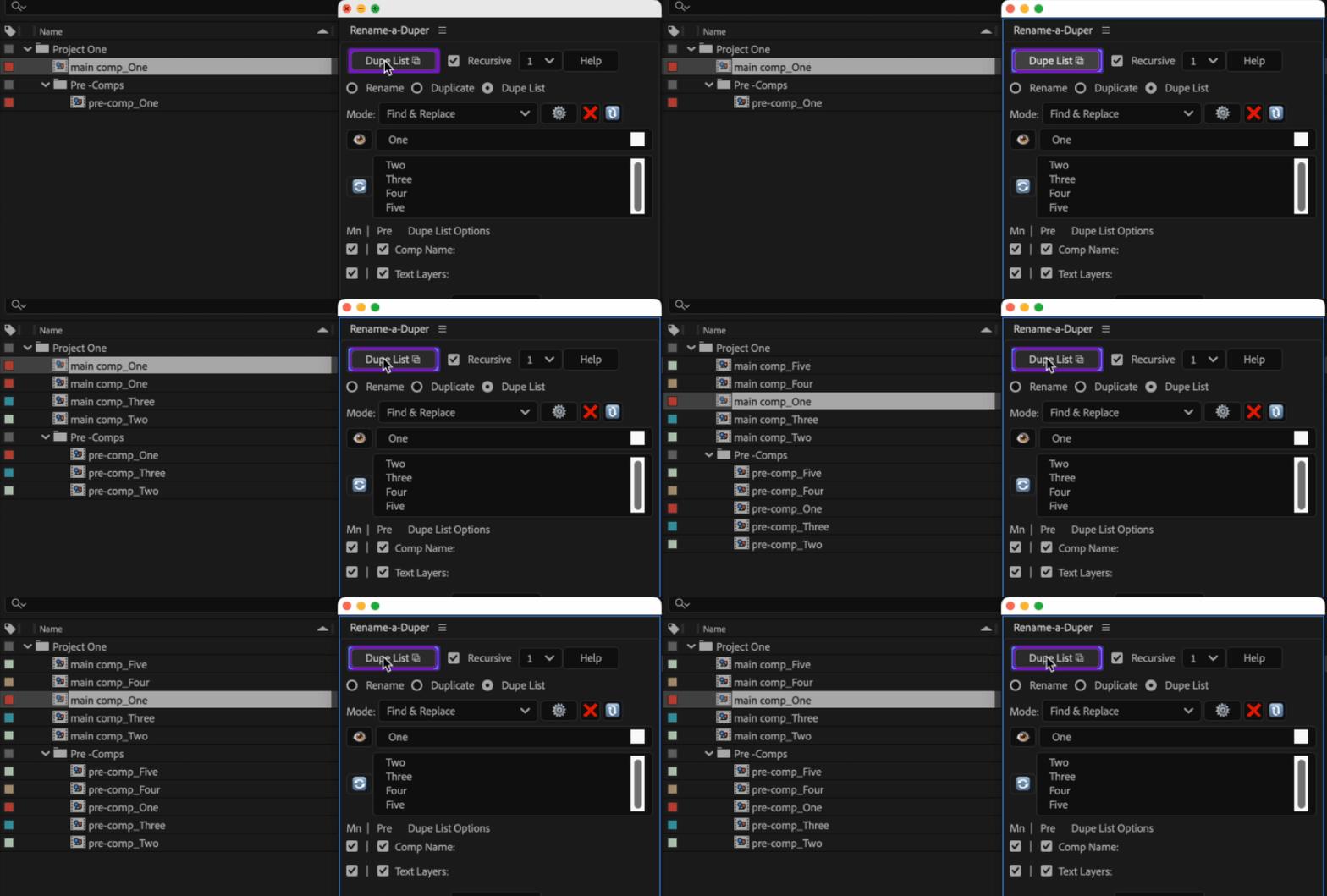
Rename-a-Duper is an After Effects script for renaming or duplicating compositions and changing the text inside them in the same pass. It works with selected comps in the Project panel or Timeline, and can also process nested pre-comps. That makes it suited to template work where a project needs alternate names, text, or versions without editing each comp one at a time.
Rename comps or create versions
The script has six modes, including Find & Replace, Multiple Find & Replace, Force Replace, Named Text Layers, Spreadsheet Named Text Layers, and Spreadsheet Find & Replace. The first modes cover quick changes to comp names and text. Named Text Layers targets text layers by name and can change their visibility. The spreadsheet modes help create multiple versions from structured entries.
The built-in spreadsheets support CSV import, and sets can be saved and loaded as JSON for reuse. The spreadsheet modes allow up to 500 entries. You can also enter a list of replacement values for Dupe List mode, which creates a duplicate for each item.
Choose which layers and pre-comps to process
Recursive processing can be limited by depth, with options for working on the main comp, pre-comps, or both. Filters can skip locked, shy, hidden, or guide layers and text layers. You can include or exclude items by label color, or match layer names that start with, contain, or end with specified text.
These controls help when a template contains text or pre-comps that should stay untouched. Rename-a-Duper can also apply prefixes or suffixes, and its sanitized search can match names even when spaces or special characters differ between a comp name and its text.
Preserve text styling and fix affected expressions
When replacing text in a layer that uses multiple character styles, Rename-a-Duper retains fonts, font styles, colors, and font size. It can also fix expressions affected by renaming or duplicating comps and check that comp names are unique.
For larger batches, the script can group renamed or duplicated comps and related items into project folders. It can preserve folder or comp hierarchies, or place items together without a hierarchy. In the Project panel, it can duplicate footage such as movies, stills, solids, audio, vector items, and 3D objects.
Adjust composition settings
During processing, Rename-a-Duper can change frame rates, start times, durations, and background colors for comps or pre-comps. Start time and duration changes can be entered in frames or timecode. A summary can track processed items, and the Select Duplicates option selects the new comps when the operation finishes.
Optional external scripts
The product can run additional external scripts during renaming or duplication. The optional helpers can split first and last names, resize comps, and convert text to uppercase or lowercase. UnSolo clears solo mode on soloed layers and turns off visibility on previously visible layers. Translate Whole Comp is an experimental, Mac-only external script that calls Apple Shortcuts to translate every word in a composition.
For the listed After Effects compatibility and the free trial, see the Rename-a-Duper product listing on aescripts.