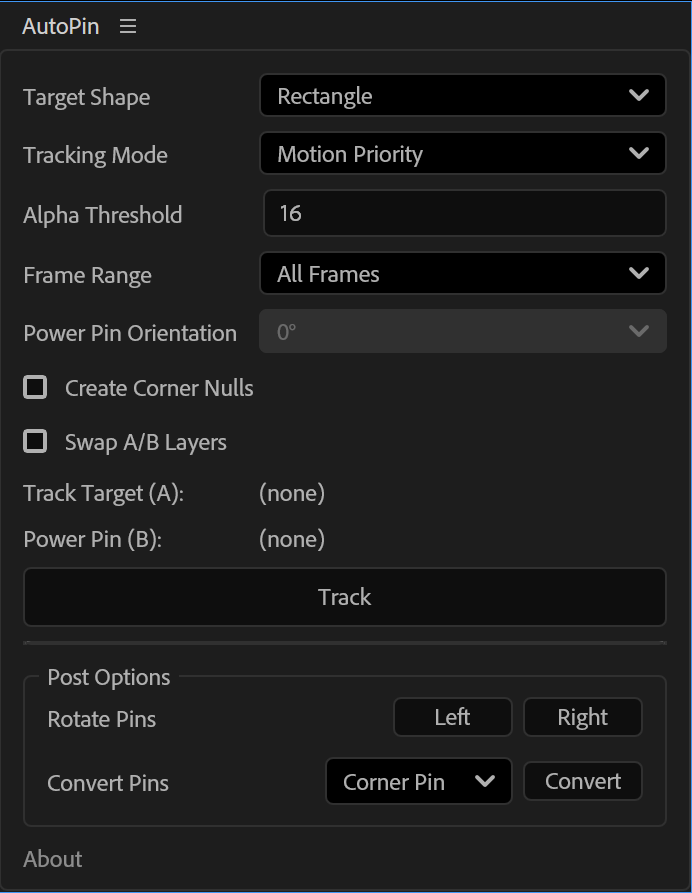
Auto Pin is an After Effects tool for automatic corner tracking. Select a target layer and press Track; it analyzes the layer's alpha channel and applies the tracking result to After Effects' CC Power Pin effect. No tracking points are required.
Tracking method and workflow
Auto Pin follows a layer's alpha boundary. The product listing describes Mocha AE and After Effects' standard tracker as tracking image features and textures. Auto Pin is a fit when the selected layer's alpha outline provides the boundary to follow.
The developer reports that, after frames are cached, tracking four seconds of 24 fps Full HD footage takes about one second. Auto Pin can also adapt CC Power Pin tracking between layers of different sizes without extra setup, and can create nulls from the tracking result. The listing says analyzing the entire frame helps maintain stable tracking during large movements between frames.
Compatibility and project sharing
The listing names compatibility with After Effects 2023 through 2026. Because the tracking uses After Effects' standard CC Power Pin effect, the developer says projects can be shared and rendered without Auto Pin installed.
Trial and license conditions
The trial behaves like the full version for seven days. It displays an activation prompt each time the product runs, which users must skip manually. The displayed EULA, updated October 21, 2025, permits one copy to be installed and used on one computer at a time, plus one archival copy stored on a medium other than a hard drive and used only for reinstallation. Use across multiple users or additional copies requires an appropriate license for each user and copy.