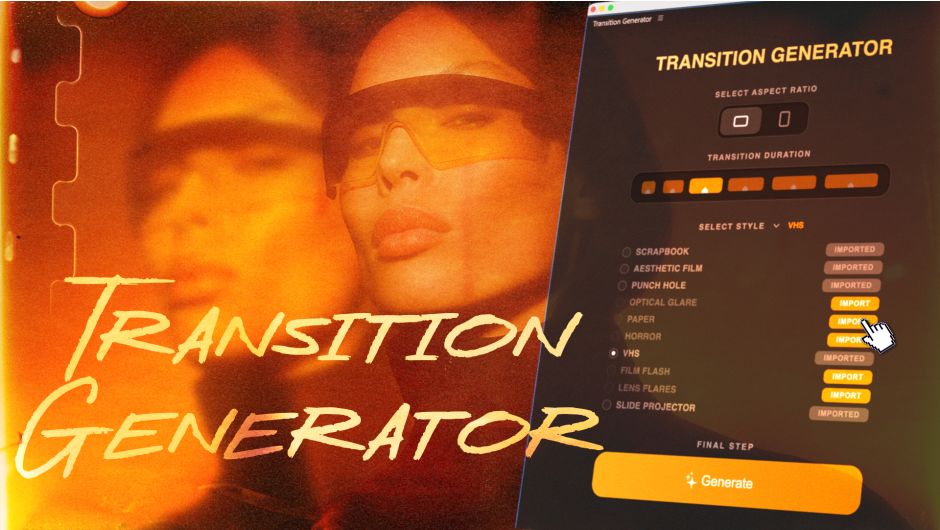
Transition Generator creates transitions at a clip cut in After Effects or Premiere Pro. Choose a style, place the playhead at the cut, and click Generate. The script combines assets and timing dynamically, so each result can vary instead of repeating a fixed preset.
12 built-in transition styles
- Prism Lens: lens-based transitions.
- Photo Match Cut: stop-motion-style photo sequences.
- Scrapbook: stop-motion collage effects.
- Aesthetic Film: soft, vintage cinematic roll effects.
- Punch Hole: film damage and perforations.
- Optical Glare: light leaks and reflections.
- Paper: textured, torn, or crumpled reveals.
- Horror: glitchy, atmospheric cuts.
- VHS: tape tracking and distortion.
- Film Flash: brief overexposed frame burns.
- Lens Flares: anamorphic and spherical light effects.
- Slide Projector: mechanical photo-carousel transitions.
Set the format and pacing
Choose the horizontal or vertical format to match the sequence. The listing identifies these as 16:9 and 9:16. A duration setting controls relative pacing; generated elements can have a different frame count each time, so the setting does not specify an exact frame count.
Generate a transition at a cut
- Choose the horizontal or vertical format.
- Set the transition duration.
- Use Import beside a style to load its required source assets into the project.
- Select the style with its radio button.
- Place the playhead at the cut between two clips and click Generate.
Import Once loads source files into the project root only when needed. Version 2.3 adds a Copy to Source button for saving imported assets to the active project folder.
Compatibility and latest listed update
Transition Generator is listed as compatible with After Effects 2024 through 2027 and Premiere Pro 2023 through 2027. Version 2.3, dated November 4, 2026, adds Prism Lens transitions and horizontal, vertical, and radial blur direction modifiers for that style. Version 2.1 fixed imported-style searches in project folders and subfolders, and missing sound effects in Paper transitions.
See the Transition Generator product listing for its current compatibility details and release information.