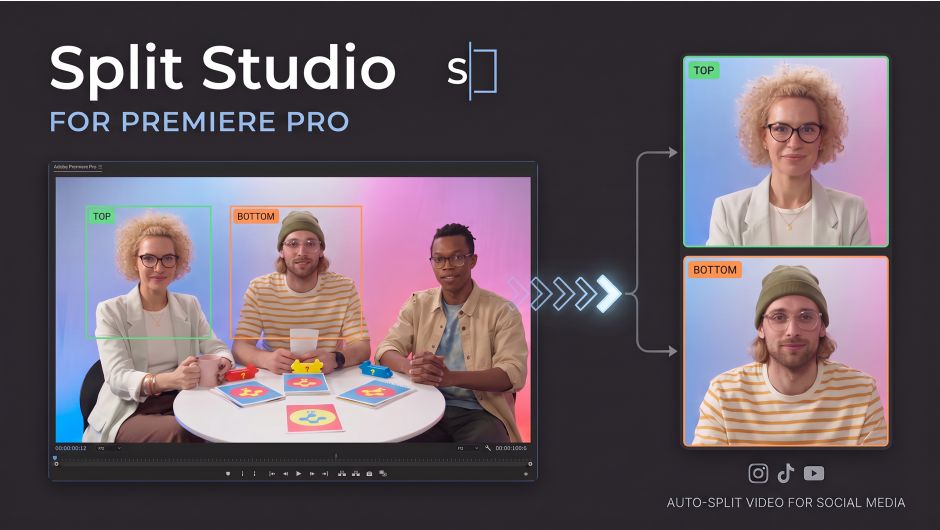
Split Studio is a panel for building split-screen edits in Premiere Pro. Instead of nesting each clip and setting Motion values one layer at a time, you crop footage in one viewer, compose cells in another, then apply the layout to create a nested sequence. The official product listing describes the Premiere Pro workflow and also lists After Effects compatibility.
Build a composition from source footage
Split Studio separates the source crop from the cell that holds it. In the Source Viewer, masks frame footage from the active sequence. In the Output Viewer, place cells in a 9:16, 1:1, 4:5 or 16:9 composition. Fit, Fill and Stretch control how footage fills a cell; scale, rotate and flip adjust its placement. Because crop and cell geometry are independent, resizing an output cell does not change its source crop. The preview is designed to match the result created by Apply.
Change layouts along the timeline
One playhead drives both viewers. You can set hold keyframes where the composition changes, or scan editorial joins and scene changes within a clip, then turn detected points into layout keys. Apply builds the segments into a new nested sequence with frame-tight joins. This workflow suits edits where reactions, gameplay cameras or podcast layouts change as the footage progresses.
Start with a preset or save a custom layout
The listing includes 14 presets for reaction videos, gameplay with facecam, podcasts, picture-in-picture, before-and-after comparisons, dual PiP, top-and-bottom or left-and-right splits, triple layouts, four-cell grids and side stacks. Use a preset as a starting point, then draw additional cells on the output or adjust the geometry. Save a layout as a reusable template or export it as a .splitpro.json file.
What Apply creates
Apply builds a new nested sequence with the layout's Motion values and an optional background. The product page says the original timeline stays untouched. It also notes that Split Studio uses Scale and Position for framing rather than Premiere's Motion Crop, so nested sequences retain their framing.
Compatibility and trial
The aescripts listing shows After Effects and Premiere Pro compatibility for versions 2025, 2026 and 2027, with Mac and Windows availability. Its detailed split-screen walkthrough focuses on Premiere Pro. The free trial includes two Apply builds.