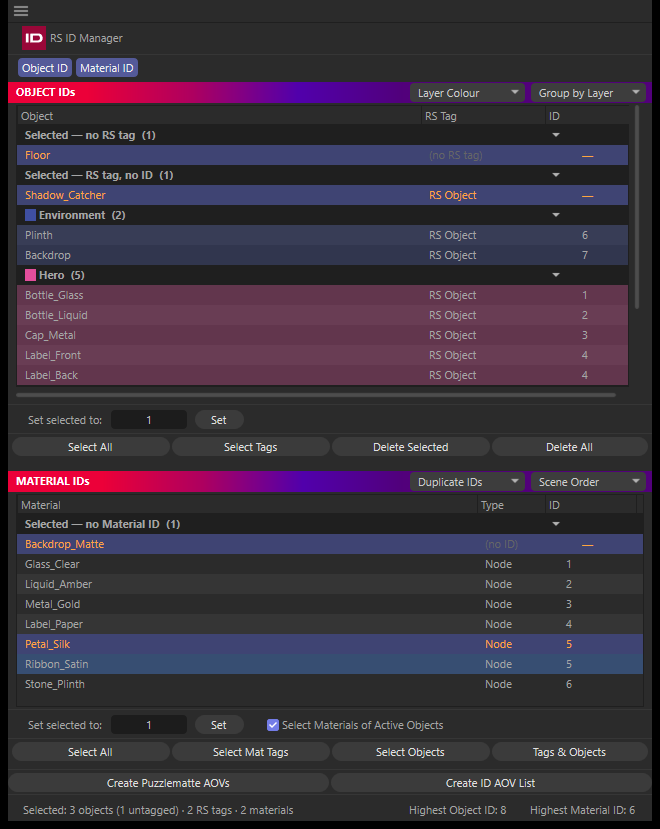
RS ID Manager is a dockable Cinema 4D panel for setting and reviewing Redshift Object IDs and Material IDs. Select objects or materials, enter an ID, and press Set. The panel also marks duplicate IDs and can build Puzzle Matte AOVs from the assignments.
Set object and material IDs from the scene
For objects, the panel follows the Object Manager selection, including selected RS Object tags. If a selected object has no RS Object tag, Set adds one and enables its ID override. For materials, the list includes Redshift node materials and legacy Xpresso materials; Set writes the ID to the material's output node. With Select Materials of Active Objects enabled, selecting an object also selects the materials it uses.
Changes are made in a single Cinema 4D undo step. An ID of 0 switches off an object's ID override. For a material, 0 clears the Material ID.
Assign one ID or a distinct ID to each item
When you set an ID on several objects or materials, choose whether the selection should share one ID or receive unique IDs. Same ID puts the selection into one matte. Unique IDs counts upward from the value you entered and skips IDs already in use, so the new items do not join an existing matte.
Review and organize IDs
Duplicate IDs are coloured by group, making shared values visible in the list. Sort by ID, keep scene order, or group items by layer. Layer groups show the layer colour and item count, and can be folded. The panel uses Cinema 4D's native tree view and has no row limit.
Create Puzzle Matte AOVs when needed
The Create Puzzlematte AOVs command packs three IDs into each pass, using the red, green, and blue channels. You can create Object ID and Material ID mattes, with optional reflection and refraction IDs. Choose multi-pass output or direct output with its own EXR compression and file path. Redshift resolves path tokens such as $filepath and $prj. Running the command again updates the AOVs RS ID Manager created instead of adding another set.
Create ID AOV List writes the scene's IDs into an annotated null for the compositing handoff. Both AOV creation and the ID list are made only when you request them.
Compatibility and installation
RS ID Manager supports Cinema 4D 2024 and later with Redshift; the explicit compatibility list covers Cinema 4D 2024, 2025, 2026, and 2027. It is listed for Windows, and for macOS computers with Apple silicon. Install through the aescripts + aeplugins manager or the ZXP/UXP Installer. After installing, restart Cinema 4D and open RS ID Manager from the Chroma menu or Extensions. A seven-day trial starts from Add Trial in the manager's Account menu. See the RS ID Manager product page for its current compatibility and installation details.