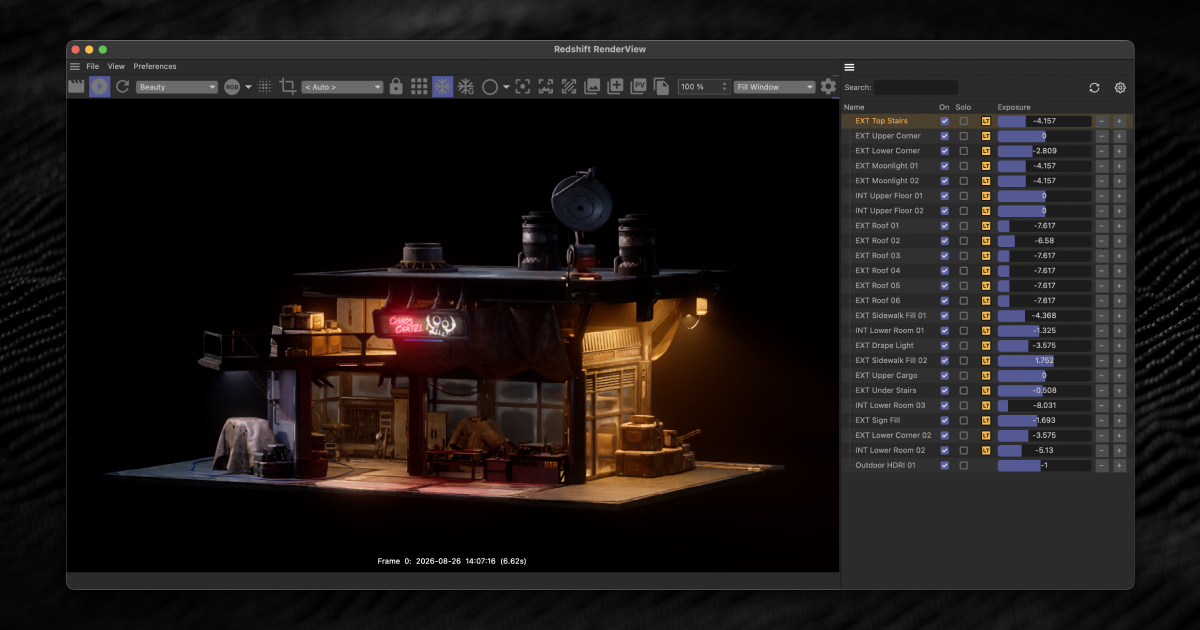
Redshift Light Manager is a Cinema 4D plugin that requires Redshift and puts scene lights in one panel. Each light appears on its own row, so you can compare settings and adjust a light without searching through the Object Manager. It is aimed at scenes where keeping track of several lights has become cumbersome.
Adjust and compare scene lights
The panel shows each light's name, type, color, intensity and layer. Compare lights side by side as you refine the scene.
- Nudge exposure in quarter-stop or half-stop increments, or enter an exact value.
- Adjust color and temperature to change the lighting in the scene.
- Use filters and groups to locate lights in a busy scene.
Install it through Cargo
Greyscalegorilla distributes Redshift Light Manager through Cargo. With Cinema 4D closed, select it and its version in Cargo's Connector, then install the connector. Open Cinema 4D once to activate the license, then return to Cargo and install Redshift Light Manager from its Tool page. Restart Cinema 4D after installation. Greyscalegorilla says to keep Cargo open while working because it maintains the connection to the scene and keeps plugin licenses active. See the Cargo and plugin instructions.
Compatibility and access
Redshift Light Manager's product page lists Cinema 4D versions 2023 through 2026, while the What's New page lists Redshift Light Manager among plugins running in Cinema 4D versions 2023 through 2027. Check the current Cargo listing for your Cinema 4D version before installing. Greyscalegorilla says support for other DCC applications is not yet available.
Redshift Light Manager cannot be purchased by itself. Greyscalegorilla says an active subscription is required to download and use its plugins. Cargo is free to download; the membership provides access to the plugin library. Check the Redshift Light Manager product page for current access details.