AE Diff compares the authoring state of After Effects projects. Use it to compare two saved AEP files or a current project against its local reference, then review or document the changes.
Compare saved projects or track a working project
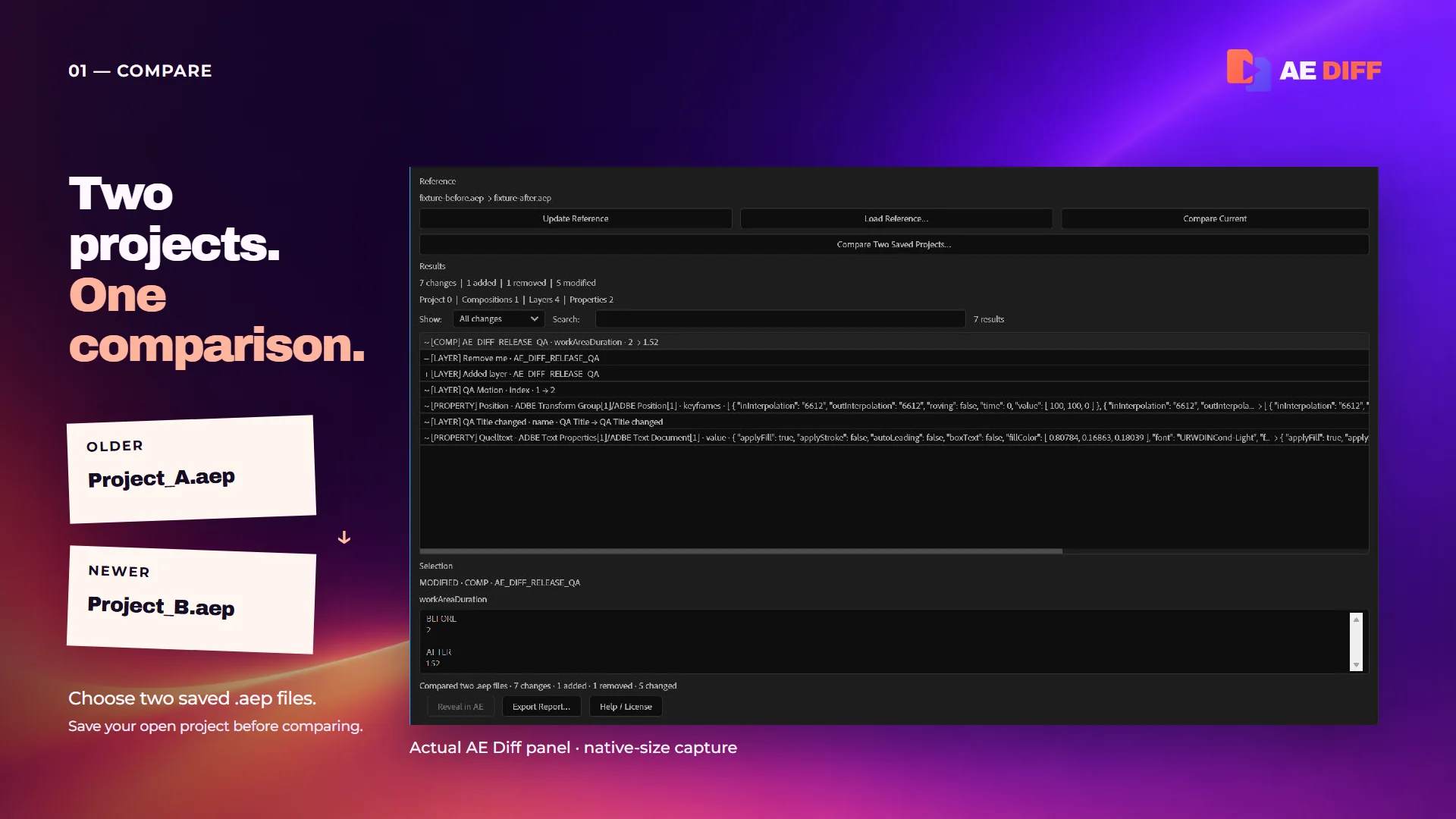
For a revision comparison, choose Compare Two Saved Projects and select the older and newer AEP files. After Effects opens and scans the files one at a time without saving them, then restores the project that was open before the comparison. Save your work first.
For ongoing work, AE Diff creates or recalls a project-specific local reference when its panel opens. Compare the current project with that reference, then choose Update Reference to make the current state the new baseline. You can also load a portable .aediff.json reference file.
Review and export changes
The results include added, removed and modified compositions, layers and supported properties. Composition changes include settings; layer changes can include names, order, timing, sources and switches. Property comparisons cover values, text, expressions, effects and keyframes exposed through the After Effects scripting API.
Search by name or value, filter by project, composition, layer or property, then select a result to inspect its before-and-after values. Reveal in AE selects the relevant composition and layer when comparing the current project; it is unavailable for comparisons between two saved projects. Export a plain-text report for project notes or a handoff. Long values may be shortened in the panel, while the report retains their complete serialized values.
Comparison limits
AE Diff compares project data, not rendered pixels. It does not merge projects, restore edits or repair renders. Keyframe comparisons include recorded times, values, interpolation types and roving flags, but not temporal ease or spatial tangent changes. Some custom-value parameters in third-party effects cannot be serialized. Revisions descended from the same AEP provide the most reliable matching.
Requirements and licensing
Use AE Diff with After Effects 2026 or later on Windows. It was verified with After Effects 2027 in the Windows Beta, build 27.1 build 36. Install it with the aescripts + aeplugins Manager app, then open AE Diff from After Effects' Window menu.
Comparisons, references and exported reports stay on your machine. Commercial licensing and update checks use the aescripts framework and require internet access. The EULA allows one copy and bars installing or using it on more than one computer at a time; each additional copy or user needs an appropriate license.