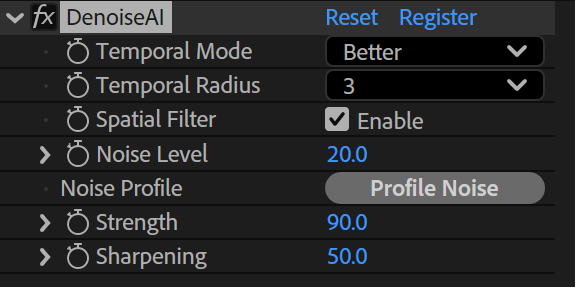
DenoiseAI is a GPU-accelerated effect for Adobe After Effects and Premiere Pro. It reduces sensor noise, grain, and compression noise in footage, including low-light, high-ISO, small-sensor, smartphone, and archival clips. The suggested place in the edit is before color grading, sharpening, or scaling.
How it handles noise
Its temporal stage analyzes motion and aligns neighboring frames to the current frame, including in footage with motion blur or occlusion. A spatial neural network then works on noise left within each frame. The Strength control adjusts how much of the spatial filter is applied, so you can keep more of the source texture or grain.
DenoiseAI estimates noise automatically. Profile Noise can measure it again on the current frame with one click. Adaptive sharpening runs after denoising to bring back softened edges and detail; set sharpening to 0 to turn it off.
Suggested workflow
- Apply the effect to the source footage before color grading, sharpening, or scaling.
- Preview the result at full resolution.
- Adjust Strength to control how much texture remains, then change Sharpening to suit the detail. If noise remains, use Noise Level or Profile Noise to reassess it.
The motion analysis is intended to handle moving subjects and complex motion, such as crowds, waves, and splashes. Review your own footage at full resolution to decide whether the result suits the shot.
Compatibility and licensing
The product listing reports support for After Effects and Premiere Pro versions 2020 through 2027 on Mac and Windows. Performance depends heavily on the GPU, and a free trial is available. Try the effect on your own system and representative footage before purchasing.
The product EULA, updated Oct 21, 2025, grants one copy and restricts use on more than one computer at a time; multiple copies or users require an appropriate license. The linked License Type FAQ, dated Nov 5, 2026, says a Single User License can cover up to two computers belonging to you if they are not used simultaneously. A Floating License requires the Floating License Server, must be used on the same network, and allows one user per license at a time. Check the license selector against your setup.