Monoline Text is an After Effects script that turns entered text into single-stroke vector paths. It can create shape layers, masks on solids, or an optional motion path on a null object. Keep the output on one layer, split it by line, or place each character on its own layer.
Shape, mask, and motion-path options
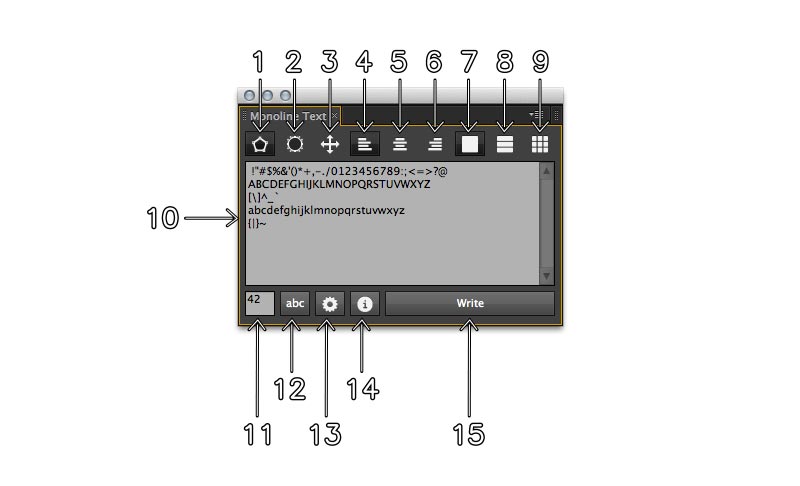
- Shapes: Create the text as shape layers.
- Masks: Put the paths on solid layers and set the solid color in the script settings.
- Additional motion path: Create a null object with a motion path. The settings also let you choose whether to create roving keyframes for that path.
Enter text in the script's text field and set its point size. The abc button adds the available characters to the field. Choose left, center, or right alignment and a layer mode, then use Write to place the result in the active composition. The Info button opens the script's quick help.
Character set and compatibility
The script is based on a character set Dr. A. V. Hershey created for engraving around 1967. It also builds on Jongware's 2010 Adobe Illustrator script using the simplex font, which was ported and extended for After Effects with permission.
The supplied product listing names After Effects CS4, CS5, CS5.5, CS6, CC, CC 2014, CC 2015, CC 2015.3, CC 2017, and CC 2018. It does not establish compatibility with later releases, so check the current product listing before using it with a newer version.
File access requirement
The listing says After Effects must allow scripts to read and write files and access the network. It says Monoline Text uses this permission to create its tool button icons and does not store data.