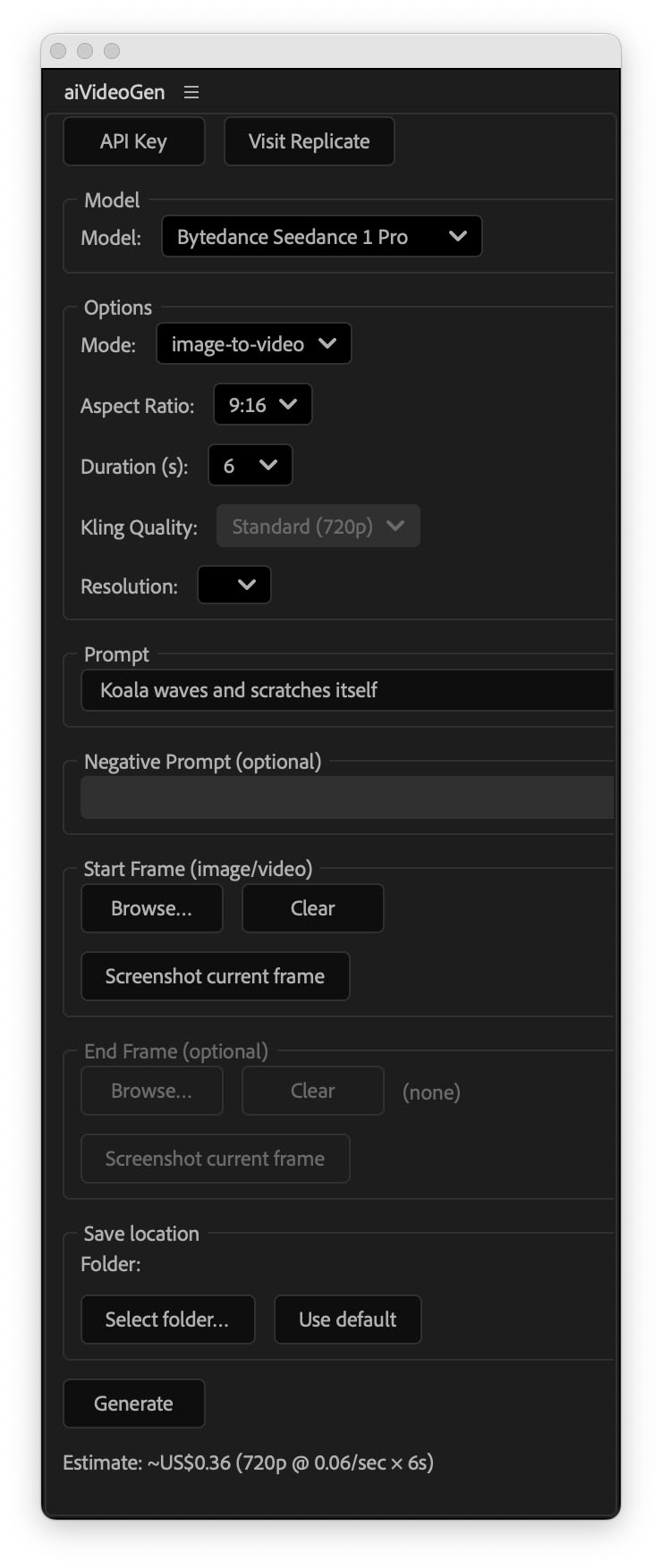
aiVideoGen connects Adobe After Effects to video models on Replicate. Enter a prompt for text-to-video, or use an image reference for image-to-video. The panel can capture the current composition as a reference, then download the generated clip and place it, scaled and centered, in the active comp.
Use frames as references
A one-click stage snapshot can provide an image reference across the listed models. For MiniMax Hailuo-02, PixVerse v5 and WAN 2.2 Fast, you can also use first and last frames from the timeline as references. That model-specific option is useful when a generation needs to follow chosen start and end frames.
Models and output controls
The listing names Kling 2.1 and Master, Bytedance Seedance 1 Pro, Google Veo-3 Fast and Veo 3.1 Fast, MiniMax Hailuo-02 and Hailuo 2.3 Fast, PixVerse v5, and WAN 2.2 Fast. The panel provides model-aware controls for aspect ratio, duration, resolution and quality, plus a cost estimator for each model. It also links to Replicate and API-key management, and alerts you to sensitive-content blocks or insufficient credits.
Requirements and licensing
Use requires After Effects v25 or later on macOS or Windows, an internet connection, a Replicate account and API key, and Replicate tokens. The vendor’s general license FAQ says a Single User License can cover up to two computers when they are not used at the same time. Floating licenses require the Floating License Server and allow one user per license at a time. The aiVideoGen listing displays a product-specific notice that the Floating License Server is required, so the general Single User License terms may not apply; confirm the license option for this product before purchase.