Andy Disassembly Assistant is a Blender add-on for separating mesh objects and creating controlled exploded views. It can split geometry into loose parts or separate faces by their assigned materials, then use explosion points to spread objects into diagrams or animations. It also works alongside other Andy's mecha plugins for production and display.
Separate parts by geometry or material
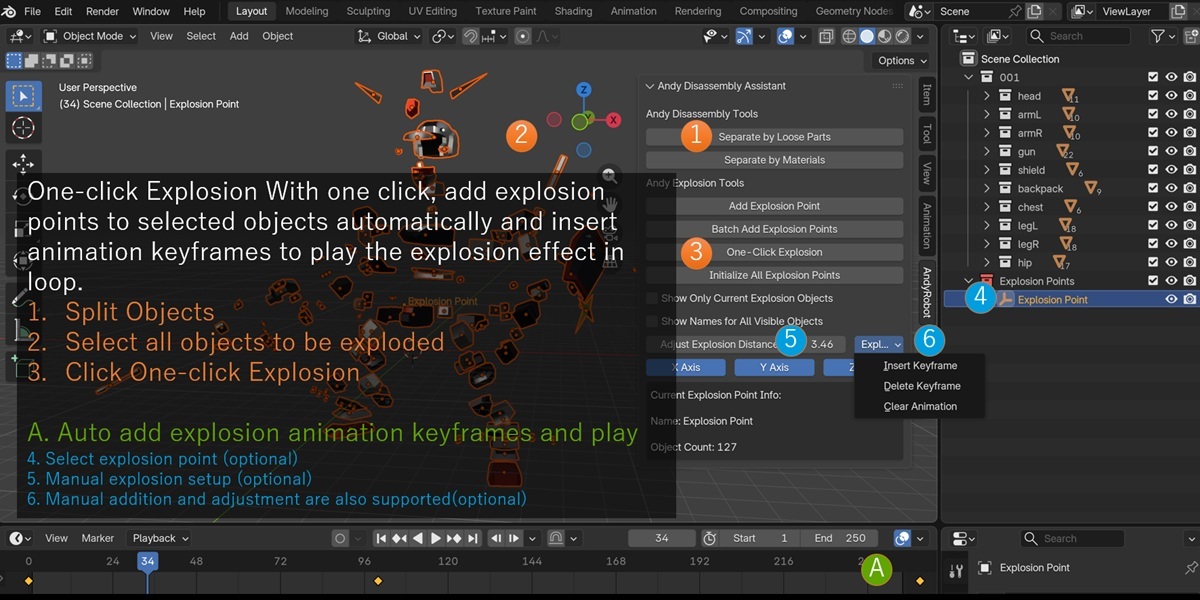
Use loose-part separation to turn independent pieces of geometry into separate objects. The documentation says the tool sets each result's origin to its geometry center. Material separation creates separate objects from the faces assigned to each material and sets suitable origins for the results.
Build an exploded view from objects or collections
Create an explosion point for a selected object group or an active collection. Batch processing supports multi-level explosion effects based on collection files: for a parent collection with several sub-collections, it can create a point for each child and a master control point at the root. The explosion distance slider controls how far objects move: 0 clusters them at the center, 1 returns them to their original positions, and values above 1 spread them farther. Controls for the X, Y, and Z axes let you limit the direction of the effect. You can reset all explosion points to their original state.
Create explosion animations
You can adjust explosion distance manually and insert, delete, or clear keyframes. The documented One-Click Explosion command creates and plays an animation sequence: objects start at their original positions on frame 0, spread to distance 3 on frame 100, then return to distance 1 on frame 255.
Check objects and labels in the scene
Display controls can show only the objects linked to the selected explosion point or add name labels to visible objects. The panel also shows details for the current point, including its name and the number of associated objects.
Compatibility and installation
The Superhive product listing specifies Blender 4.5 through 5.1 and the Cycles and Eevee render engines. Its documentation identifies the license as GNU GPL v3.0. To install, download the add-on ZIP, open Blender's Edit > Preferences > Add-ons panel, choose Install, select the ZIP, and enable Andy Disassembly Assistant. The listing does not specify a separate add-on version number, so check the product page for current package details.