Relink offline media from a new folder
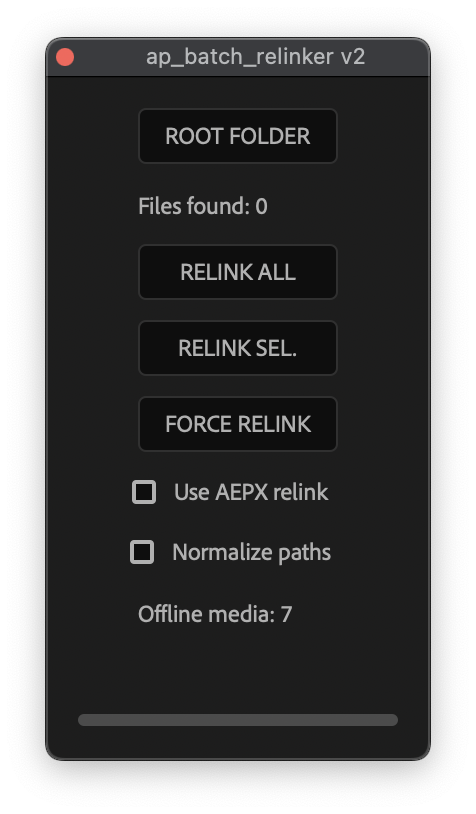
ap_batch_relinker is an After Effects script for restoring links when footage has moved or been renamed. Choose a new root folder and it scans for candidate files, comparing normalized names so special characters do not prevent a match. For example, an offline file named "vidéo.mp4" can match a scanned file named "video.mp4".
Choose which footage to relink
Use RELINK ALL to relink offline media throughout the project, or RELINK SELECTION to work only on footage selected in the Project panel. Select any item that appears online but points to the wrong file or path, then FORCE RELINK runs the matcher on that selected item even if After Effects marks it online.
When several scanned files match one offline item, choose which candidate to use. If a candidate is in a folder with the same name as the offline source folder, the script relinks it automatically. It also supports image sequences.
Handle layered files and path changes
After Effects can interpret PSD, PSB, and AI footage as separate layers. The script warns about these files: forcing a regular relink can lose the separate layers. Its AEPX method uses an intermediate AEPX file to patch paths in the project XML; the product listing says this method is faster and preserves those layers.
An optional path-normalization step can rename files and folders on disk to remove accents and special characters. A preview lets you toggle individual renames before applying them. Review those changes when other projects or applications may refer to the same filenames.
Compatibility and licensing
The product listing specifies After Effects 2024, 2025, and 2026. It displays $10 as a suggested price. Individual users may pay any amount; businesses and teams must pay the suggested price to receive a valid license. The EULA grants one copy for use on one computer at a time. Additional users or copies require appropriate licensing for each user and copy.