Audio System Designer is a Blender extension for planning loudspeaker placement and comparing predicted coverage for live sound. The listed release is 0.2.0 and supports Blender 4.2 or newer. The developer describes it as early and not validated against measurements, so treat its output as a way to compare layout options, not to certify a sound system. See the official Blender Extensions listing for the release details.
Build a loudspeaker layout
The bundled speaker library includes d&b audiotechnik models E3, Y10P, V8, Y-SUB and V-GSUB, plus L-Acoustics KARA II, SB18 IIi and KS28. It also contains generic placeholders. The library draws on published datasheet figures, but its polar shapes are approximations based on nominal coverage. The extension does not include manufacturer CAD or GLL and CLF acoustic datasets; its speaker meshes are boxes at published cabinet sizes.
Place speakers by mouse, set the direction new speakers face, and arrange line arrays with auto splay. Subwoofer arrays can use ground-stack, end-fire or cardioid layouts. For audience coverage, draw receiver areas, use a mesh, or let Auto Receiver From Scene find walkable surfaces.
Inspect coverage, probes and room estimates
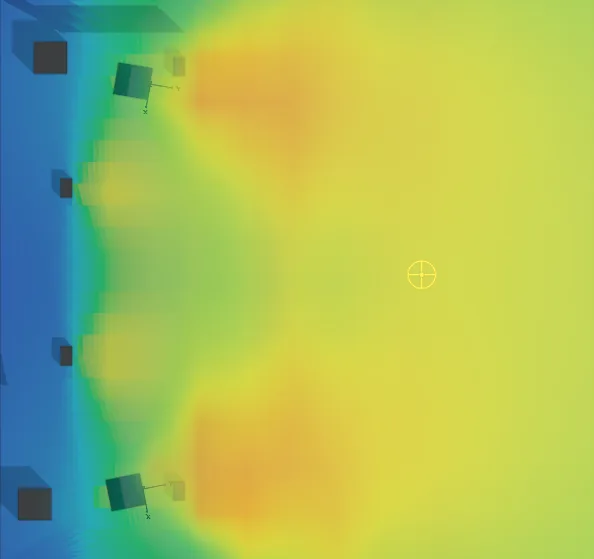
Calculate coverage with octave-band power sums or a phase-aware one-third-octave mode covering 20 Hz to 20 kHz. The model includes air absorption based on temperature, humidity and pressure, along with first- and second-order reflections, occlusion, RT60 estimates using Sabine or Eyring, and an STI estimate. A probe reports each speaker's contribution and arrival time. For a three-dimensional view, calculate a volumetric field with fog, slice planes or both.
Surfaces have per-band absorption values and can be assigned from the library or auto-assigned by material names or orientation. A PDF report can include settings, speaker and array details, room acoustics, a plan view, the volumetric field, probes, surfaces and data sources. Sections that have not been calculated are left out.
Read the predictions with care
Cabinets are modeled as point sources with magnitude-only directivity. Line-array results above about 1.5 kHz are indicative. Frequency response and directivity are tabulated by octave band, and the model holds the 63 Hz values below 63 Hz. Reflection maps use specular image sources on assigned mesh triangles and the ground plane. They do not include a diffuse or reverberant field, and they do not model diffraction. Occlusion reduces blocked paths by frequency band as a rough stand-in for diffraction.
The STI result is an estimate for comparing options, not an IEC 60268-16 measurement or prediction. Array geometry, weight and centre of gravity are also approximations, so the add-on is not for rigging calculations. Use the manufacturer's tools, such as ArrayCalc or Soundvision, for real rigging and safety calculations.
Add speaker and surface data
Create a speaker with New Speaker From Datasheet or supply speaker JSON files through the add-on's user library folder. Each speaker entry needs a source and a data_quality value; tabulated polar data and cardioid data are supported. Surface sets can also be supplied as JSON. To install the downloaded extension from disk, follow Blender's Install from Disk instructions. Questions or issue reports can go to the developer's issue tracker.