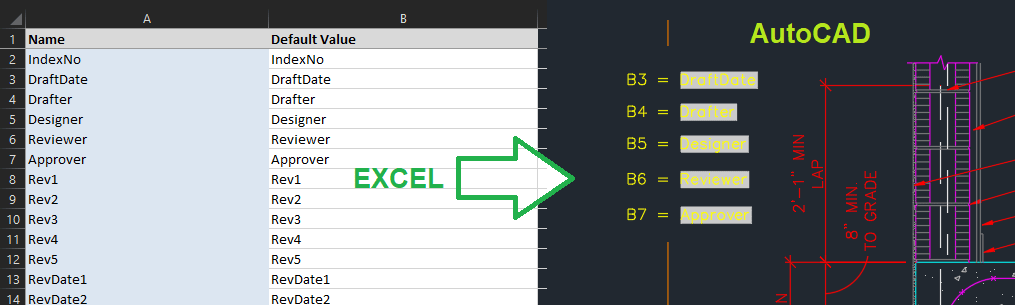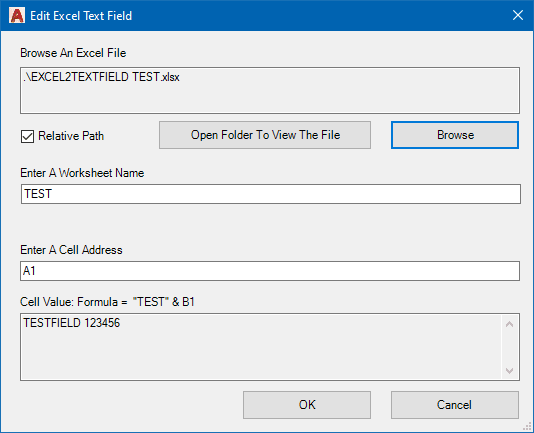
JTB Excel2TextField Trial links Excel cell values to fields in CAD drawings. The Autodesk Marketplace listing describes Excel as the main source: when the spreadsheet is updated, the drawing is updated too.
Supported field locations
Fields can be placed in:
- Text and mtext
- Tables
- Block attributes
Update behavior
When a reference workbook changes, JTB World's instructions say to run ExcelTextFieldUpd and select the texts, mtexts, or blocks to update, or run ExcelTextFieldUpdAll to scan the current drawing and update all ExcelTextFields. The Autodesk Marketplace overview says drawings update when Excel changes but does not describe this refresh step.
Trial and installation
Autodesk marks the app as a trial and displays a Start free trial option. JTB World's product page says the trial lasts 30 days from first run. Separately, the Marketplace listing says the program runs for up to 30 days after purchase before activation is required. Installation requires elevated user privileges and uses a custom installer rather than the standard App Store installer.
Product information and support
JTB World Inc. is the publisher. The Autodesk listing directs support questions to JTB World's contact page.