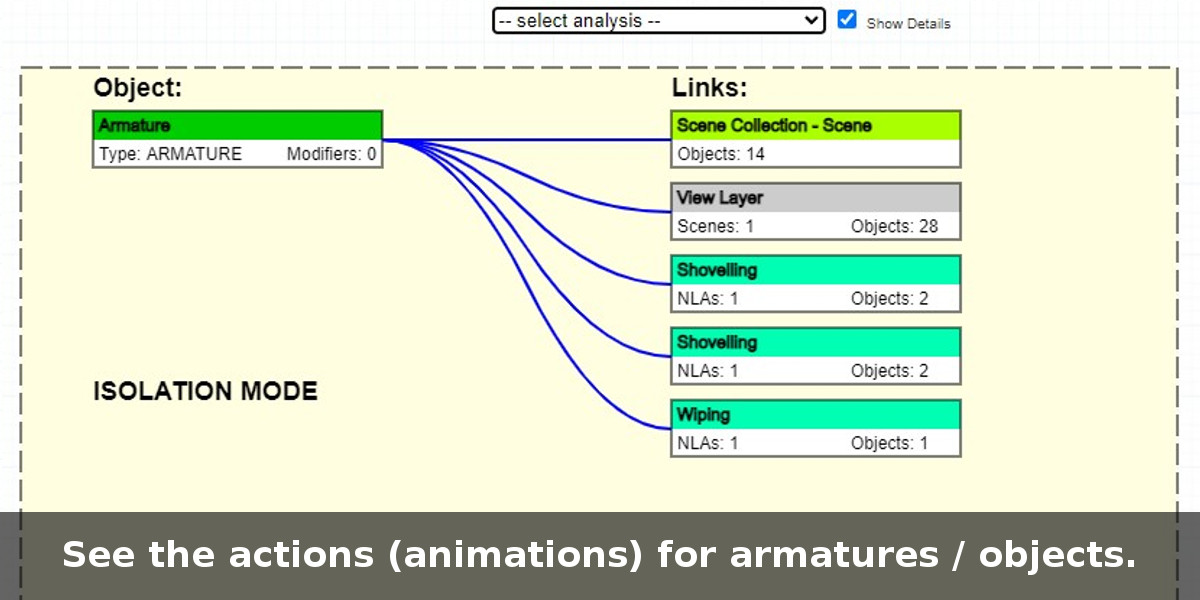
Blendalyzer is a Blender add-on that turns relationships inside a saved blend file into a single interactive HTML guide. It maps scene elements such as objects, materials, images, collections, libraries, scenes, actions and armatures. Use it to inspect a project’s structure or trace assets you may want to reuse.
Trace scene relationships
The report offers several pre-formatted views of how scene data connects. Select an element to isolate it and see its direct links. You can filter collections, materials and images, which helps when checking where a material is used or how an image connects to scene assets.
The mapped data also includes views and sounds, alongside objects, collections and other Blender elements. This gives you a way to browse relationships across a project without searching through each item in Blender’s Organizer.
Review files and reusable assets
Blendalyzer reports which files are packed and their size in memory. It also identifies external file locations and the library assets used by a scene. Mesh objects and armatures can be scanned when you are looking for assets to reuse.
A top ten heavy objects view helps you spot objects to inspect, and you can set node colors before generating the analysis. The developer describes the add-on as 15 KB, with the browser handling the report display.
Output and setup
Blendalyzer writes the analysis to one HTML file and opens it automatically in a browser. Save the blend file before running the add-on. The developer says it checks whether the file has been saved and displays a message if it has not.
Version and license
The Superhive listing states Blender versions 3.0 through 5.0 and lists the license as GPL. Its release history identifies add-on version 1.3.0, dated December 29, 2025, as updated for Blender 5.0+. Since the listing range and release note use different wording, check the Superhive product page for compatibility with your Blender version.