HyperFlow 3D Suite is a Blender add-on that puts four geometry and rendering workflows in the 3D Viewport sidebar, under the HyperFlow 3D tab. The workflows cover sculpt retopology and PBR map baking, animation denoising, adaptive displacement, and refractive caustics. See the Blender Extensions listing for the developer’s description and release details.
Retopology and PBR map baking
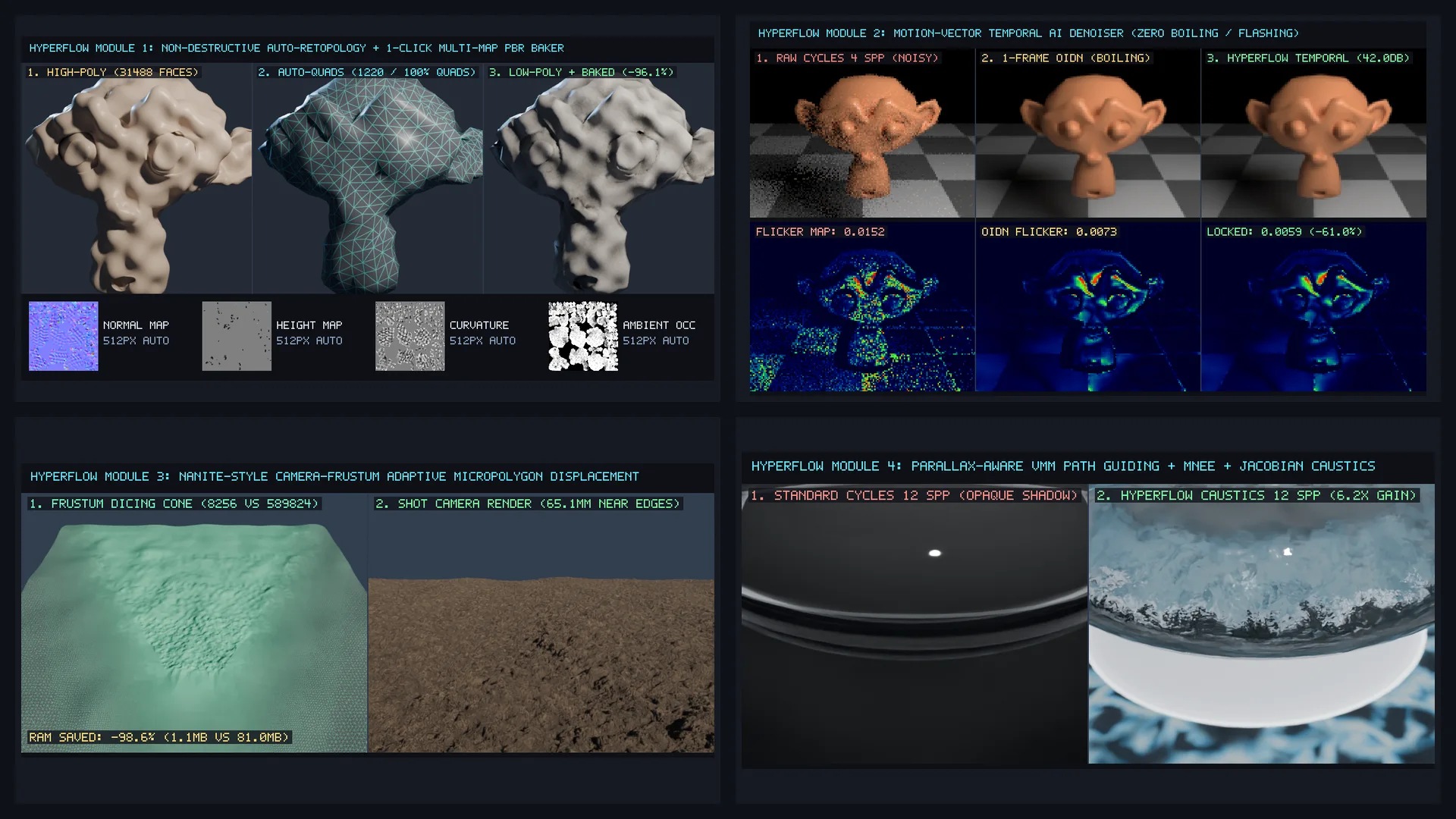
For high-poly sculpts, the add-on’s listing describes an auto-retopology process that uses an internal proxy to repair non-manifold areas before running QuadriFlow. It says the process leaves the original sculpt unchanged. Two passes of curvature-weighted relaxation are followed by closest-surface reprojection to guide edge loops toward creases and ridges.
The baking workflow outputs a 16-bit tangent-space normal map, a 32-bit-float signed displacement EXR, mean-curvature and cavity data, and ambient occlusion. The listing says the outputs are baked into a ready-to-render Principled BSDF v2 material.
Temporal denoising for animation
The denoiser uses bidirectional optical-flow reprojection and compares normals, depth, and albedo between frames. This is intended to reduce temporal flicker, sometimes called luminance boiling, in rendered animation.
The listing reports a 60.98% reduction in luminance change against noisy 4-sample-per-pixel input and 19.13% against single-frame OIDN, with a spatial PSNR of 42.03 dB. The retrieved listing does not include benchmark scene, hardware, or test-procedure details, so treat these as developer-reported results rather than expected gains for every project.
Adaptive displacement and refractive caustics
The displacement workflow combines Geometry Nodes with Cycles Adaptive Subdivision. It culls geometry outside the active camera’s view and reduces subdivision as camera distance increases. The listing describes a RAM budget guard and reports a 98.60% memory reduction on dense terrain, without benchmark conditions.
For rendering, the add-on configures guided shadow caustics for Cycles. Its analytical spectral-dispersion shader node group is listed as working in both Cycles and EEVEE Next.
How to access the tools
In Blender’s 3D Viewport, press N to open the sidebar and select the HyperFlow 3D tab. Choose a sculpt, terrain, refractive glass mesh, or animation scene, then run the matching operator.
The listing shows version 1.0.1, published November 8, 2026; the release notes for that version are dated November 10. It requires Blender 4.2.0 or later, lists the GNU GPL v3.0 or later, and says the add-on requires no special permissions. Blender’s Install from Disk instructions cover the installation step. For support, use the developer’s issue tracker.