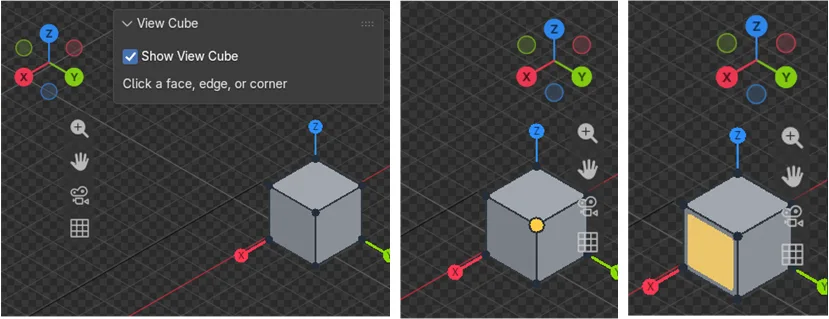
View Cube Navigator adds a CAD-style view cube to Blender. Hover over a face, edge, or corner to highlight a view, then click to align the viewport with a short eased transition.
Choose views with faces, edges, and corners
Each face, edge, and corner is a clickable target. You can click anywhere along an edge; the add-on does not use midpoint handles.
Find and toggle View Cube Navigator
The cube appears below Blender’s standard navigation gizmo, which remains in place. Toggle View Cube Navigator from the View Cube sidebar tab. Its CAD-style interaction may suit users who want precise viewport positioning while setting up product-render views.
Compatibility and installation
The Blender Extensions catalog lists version 0.6.2 for Blender 5.2.2 LTS and newer. The developer notes that older versions may work but have not been tested, so compatibility below 5.2.2 is unconfirmed. The listing offers drag-and-drop installation or downloading the add-on and choosing Install from Disk. See the Blender installation guide for the latter option.
View Cube Navigator is published by Avarachan under the GNU GPL 3.0 or later and requires no special permissions. The Blender Extensions listing has the current release details; the developer’s repository is listed for source code and issue reports.