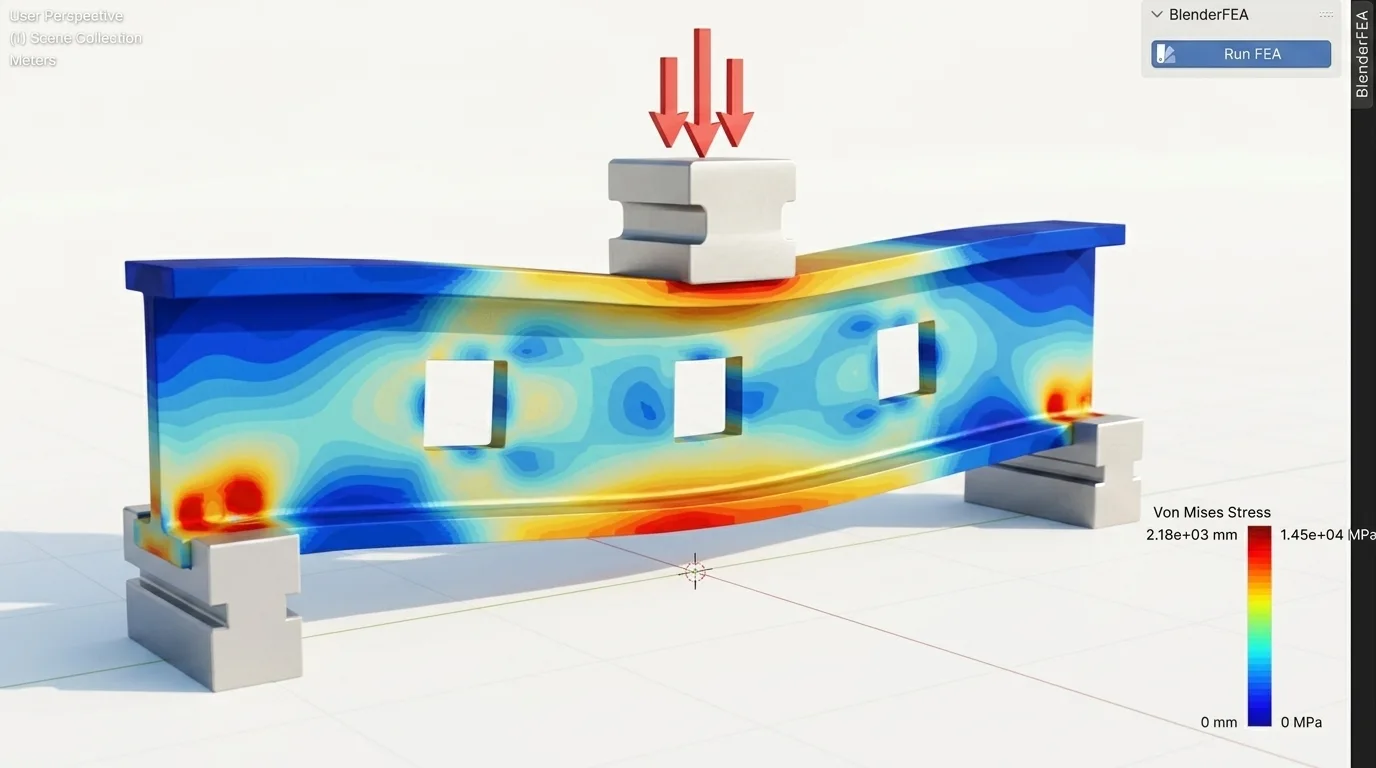
VoxelSim FEA runs linear-elastic finite element analysis on closed meshes inside Blender. You can set supports and loads in the scene, choose material properties, and inspect calculated stress, displacement, and safety factor without exporting the model to a separate FEA package. The add-on is listed as version 2.6.5 for Blender 4.2 or later.
Define the model in Blender
VoxelSim FEA uses mesh objects to define where a part is held and where a force acts. Place a support mesh at a constrained area and choose which axes to lock. Per-axis X, Y, and Z controls can represent a roller support. Place a load mesh where the force acts, then enter its force vector in newtons. The add-on voxelizes the part and assembles the model from these scene objects.
For material properties, choose a built-in preset for structural steel, structural aluminum, ABS, or polypropylene (PP). A custom material slot accepts values from a material datasheet. The interface uses GPa for stiffness and MPa for yield strength, while the solver reports stress in MPa and displacement in millimeters.
Inspect stress, displacement, and safety factor
After a solve, VoxelSim FEA creates four result views in a “VoxelSim FEA Results” collection. Von Mises stress and displacement magnitude are mapped onto the part’s surface. The safety-factor view calculates yield strength divided by von Mises stress. A voxel cross-section uses a Geometry Nodes clip plane that you can move through the part to inspect internal stress. An on-screen color legend identifies the displayed values.
The analysis is linear-elastic, and the safety factor is a calculation based on the chosen yield strength and the simulated stress. Those results depend on the material values, loads, and supports you define. Treat them as results for the model you set up, not as certification that a manufactured part is safe.
Compute options and compatibility
The compute setting can use Auto, which the project recommends, CPU, or multi-process CPU. The project describes its solver as a matrix-free conjugate-gradient method. Version 2.6.5 supports Blender 4.2 and later. The official Blender Extensions listing includes downloads for Windows, macOS, and Linux variants.
The 2.6.5 listing also records a maintainer response to a report about very narrow supports. The response says the code was updated to improve their behavior. If a support is narrow, check the resulting model carefully. See the VoxelSim FEA project repository for the project’s feature details and issue link.