Calc AE is a dockable After Effects panel for entering and calculating timecode without leaving your composition workspace. It reads the active composition’s frame rate and displays timing in both timecode and frame counts. When you switch compositions, hover over the panel to refresh its frame-rate display.
Insert timing from your composition
Enter timecode manually or use the Timecode Assist Tools to pull values from layers, keyframes, the current time indicator (CTI), markers, or the work area. The modifier actions let you insert a specific boundary or calculate a duration:
- Layers: Insert the span from the first selected layer’s inpoint to the last outpoint. Ctrl inserts the earliest inpoint time; Alt inserts the last outpoint time.
- Keyframes: Insert the span from the first selected keyframe to the last. Ctrl inserts the earliest keyframe time; Alt inserts the last keyframe time.
- CTI: Insert the current time. Ctrl inserts the duration between the CTI and the earliest selected-layer inpoint; Alt inserts the duration between the CTI and the last outpoint of selected layers.
- Markers: Insert the span between the first and last marker on selected layers. With no layers selected, the tool uses composition markers. Ctrl and Alt insert the first and last marker times.
- CTI Markers: Insert the span between the markers on either side of the CTI. It uses composition markers when no layers are selected. Ctrl inserts the left marker time; Alt inserts the right marker time.
- Work Area: Insert the composition work-area duration. Ctrl inserts its start time; Alt inserts its end time.
Reuse results and move through the timeline
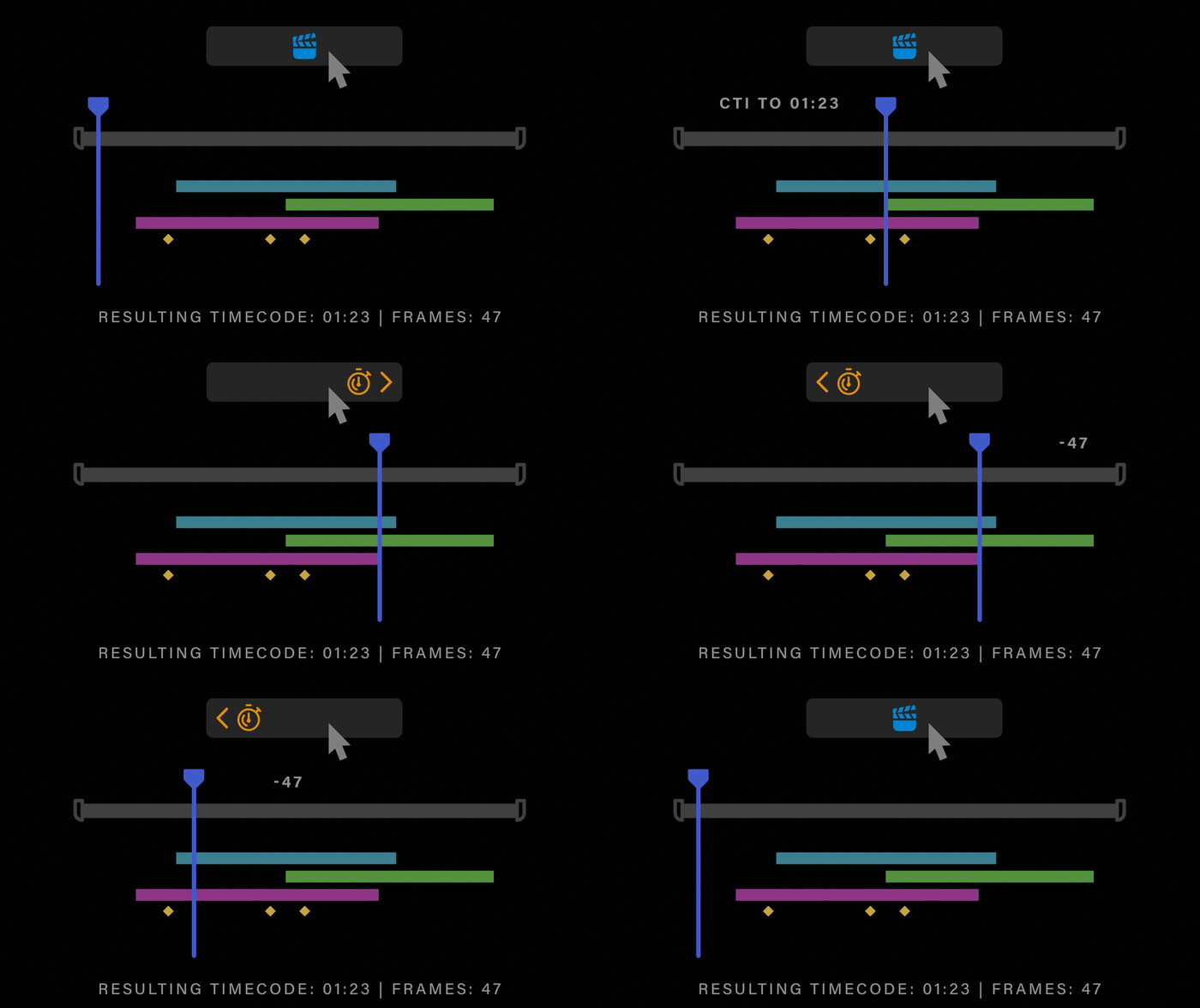
Insert Value places the current result into the calculation. Ctrl recalls a saved timecode value, while Alt stores the current value for later use. Go to Time moves the CTI to the resulting timecode; Ctrl moves it left and Alt moves it right by the number of frames in the result.
To show or hide the math operations row, use Shift + Calculate to open settings. Restart Calc AE for the layout change to take effect.
Compatibility and licensing
The product listing supports After Effects 2026, 2025, 2024, 2023, 2022, 2021, 2020, and CC 2019. It also lists a free trial.
The EULA grants one copy for use on one computer at a time and does not allow use by multiple users under that copy. Additional copies or users require an appropriate license for each.