What CenterLine does
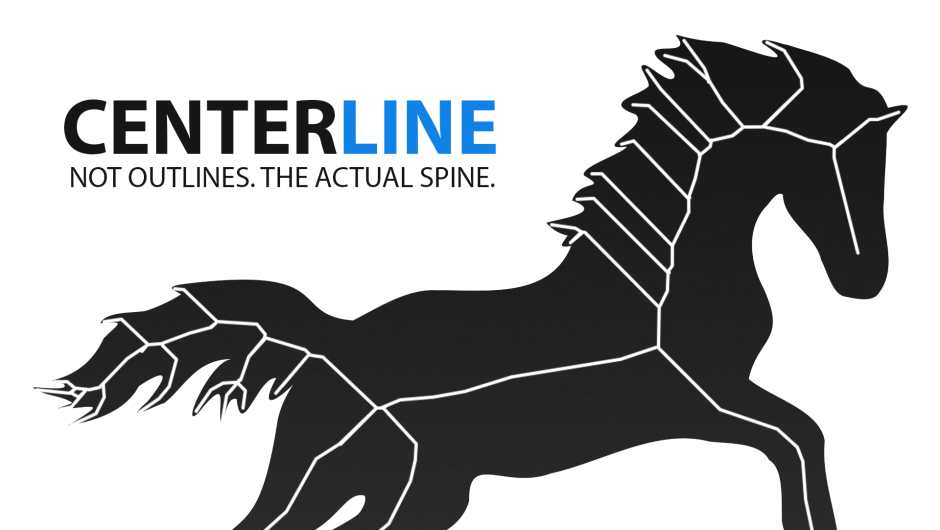
CenterLine turns artwork in an After Effects composition into single-pixel centerline paths. Where outline tracing follows the two edges of a stroke, CenterLine extracts a skeletal path through its middle. It fits the result to cubic Bezier curves and can simplify redundant nodes, then creates native After Effects Shape Layers. You can also copy the resulting paths as SVG.
This approach suits handwritten sketches, calligraphy, logo outlines and drawn routes when the desired result is a stroke that can be animated as a line.
Prepare, clean up and animate paths
- Place text, a vector outline or a rasterized hand-drawn illustration in a fresh composition precomp.
- Apply CenterLine and adjust Threshold to separate the foreground strokes from the background. Choose Luminance, Red, Green, Blue or Alpha as the input channel; Invert Input can switch dark strokes on light paper.
- Use Gap Close to bridge breaks in the thinned paths and Smooth Iterations to prune isolated pixels and short noise branches. Bezier Fit and Fit Tolerance control curve fitting and path detail.
- Click Create Shape Layer, then add After Effects' Trim Paths operator and animate its progress to reveal the strokes.
For layered artwork, the controls include chain selection, start-point adjustment and Merge by Shape operations to change how paths are selected or combined. Width controls can use the source drawing's thickness, with up to eight positioned width points for local variation. Line color and gradients, taper, dashes and stroke roughness provide further styling options.
Compatibility and licensing
The product page lists After Effects CC 2025-2026+ and support for Windows 10/11 x64 and macOS on Apple Silicon or Intel. The posted EULA grants one copy and restricts use to one computer at a time. Multiple users or computers require an appropriate license for each user and copy.