Color Picker is a Blender add-on for choosing colors in the 3D Viewport while working in Texture Paint, Vertex Paint or Weight Paint. Hold Space over the viewport to open the picker beneath the cursor, then click or drag to select a color. Release the key and continue painting.
The add-on is designed for those three paint modes. Its product FAQ says it does not work in Sculpt Mode, Grease Pencil or the Image Editor.
Choose a picker layout
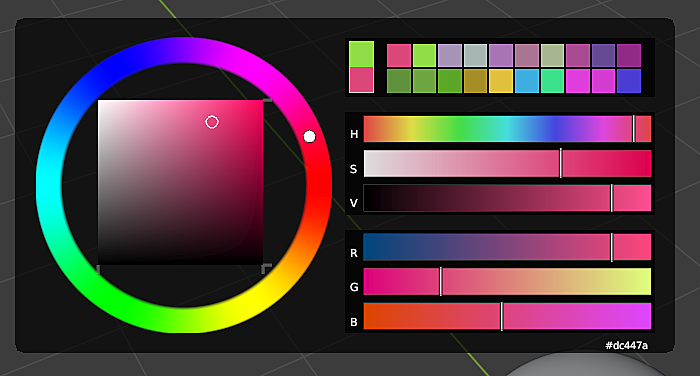
Color Picker has three layouts for different ways of selecting color:
- SV Square puts saturation and value in a square, with hue on a slider.
- SV Square + Hue Ring combines a hue ring with the saturation and value square.
- HS Color Wheel maps hue to the wheel angle and saturation to the distance from its center, with a separate value slider.
Each layout includes H/S/V and R/G/B sliders with gradients that preview the colors along each control. Color Picker also has a color preview and recent colors. In the SV layouts, marked gizmos crop the picker to a chosen rectangle.
Keep paint controls in the viewport
In Weight Paint, a visual widget beneath the cursor controls the weight on a bar from 0.0 to 1.0. Color Picker is Unified Color aware, so it edits the shared color or active brush as Blender does. A hex readout shows the current color.
You can set a separate hotkey for each paint mode and scale the widget. The add-on preferences and the 3D Viewport sidebar's Paint tab provide contextual settings, including picker type, widget size, text DPI and whether the picker closes when you release its hotkey. To keep it open, turn off Close on Hot-key Release; then close it with the hotkey, by clicking outside, or with Esc. See the Color Picker documentation for the control details.
Install the build for your Blender version
The Superhive installation notes describe the native extension as for Blender 5.0 and newer, tested in Blender 5.3. The same page's compatibility field lists Blender 3.3 to 5.3 and says builds for Blender 2.93, 3.x and 4.x are available on GitHub. Check the release notes for the package that matches your Blender version.
For the Blender 5 extension, download the ZIP, open Edit > Preferences > Get Extensions, choose Install from Disk from the menu, and select the file. You can also drag and drop the ZIP into Blender. Enter one of the supported paint modes, move over the 3D Viewport and hold Space. Older-version packages and release notes are on the GitHub releases page.
Open-source distribution
The GitHub add-on is the same product offered through Superhive; buying it there does not unlock extra features. It is free to download under GPL-3.0; a Superhive purchase supports the independent developer's compatibility updates, fixes and new features.